
OpenSyntheAI

Estrategia · Diseño · Crecimiento

Back to home

FREE RESOURCE

28 prompts to transform your logo with AI

From flat graphic to sculpture, crystal, sand, or carved stone

A logo doesn't have to live only as a flat graphic. It can also be sculpture, crystal, sand, moss, or carved stone — without losing a millimetre of its original shape.

Six of the 28. Tap one to open it, and again to jump to its prompt.

Introduction

A logo doesn't have to live only as a flat graphic. It can also become a sculpture, appear carved in stone, embroidered on fabric, formed out of sand, covered in moss, or built in crystal.

This collection brings together 28 prompts designed to turn a single brand symbol into a series of coherent, photorealistic scenes ready to use on social media, in presentations, campaigns, portfolios, or video.

The whole collection has a single priority: change the material and the setting without redesigning the logo.

Every prompt stands on its own and is ready to copy and paste. All you need to do is attach your logo or icon as a reference image before generating.

What you'll create

With this guide you can produce a sequence of 28 vertical images featuring:

  • The same logo rendered in different materials and environments.
  • Vertical 9:16 format for Reels, Stories, Shorts, and TikTok.
  • Editorial, photorealistic art direction.
  • Consistent composition across every scene.
  • Strict instructions that protect the symbol's geometry.
  • A clean final image to close the sequence with the full identity.

You can use all 28 images as a complete collection or pick only the scenes that best match your brand's personality.

Before you start

1. Prepare your logo properly

For the best results, use:

  • A PNG with a transparent background, or an SVG if your tool accepts one.
  • A sharp image of at least 1500 pixels per side.
  • The icon or symbol on its own, with no tagline or extra information.
  • A tight crop around the logo, without excessive margins.
  • The original front-facing version of the symbol, with no perspective, shadows, or 3D effects.

If all you have is the logo on a white background, that works too. The prompts instruct the model to treat the surrounding background as transparent.

2. Avoid the full lockup in scenes 1–27

Letters tend to warp when an AI tries to turn them into stone, fabric, crystal, or organic materials. For these scenes, use only the symbol or icon.

Scene 28 is designed to show the complete identity — symbol, name, and tagline — as long as your platform can reproduce text accurately.

3. Keep a single reference

Use exactly the same logo file across all 28 generations. Don't switch versions, proportions, or reference colors halfway through.

How to use the prompts

  1. Open your image generator of choice.
  2. Attach your logo or icon file as a reference.
  3. Select a vertical 9:16 aspect ratio.
  4. Copy one of the complete prompts from this guide.
  5. Paste it without removing the fidelity block or the negative constraints.
  6. Generate one scene at a time.
  7. Check that the silhouette, the inner spaces, and the proportions match the original logo.
  8. If the model alters the shape, regenerate before moving on.

For a more uniform series, keep the same model, quality level, and reference settings across every image. If your tool lets you fix a seed, use the same seed as a starting point — though you can change it whenever a scene isn't working.

The golden rule

In scenes 1–27, the AI is allowed to change:

  • The material.
  • The texture.
  • The lighting.
  • The environment.
  • The apparent scale.
  • The way the logo physically interacts with the scene.

It is not allowed to change:

  • The silhouette.
  • The proportions.
  • The orientation.
  • The negative spaces.
  • The thickness of the shapes.
  • The internal geometry.
  • The distinctive details.
  • The identity of the symbol.

If an image looks striking but is no longer recognizable as the original logo, the generation isn't valid.

Recommended settings

SettingRecommendation
Aspect ratio9:16 vertical
Target resolution1080 × 1920 px or higher
QualityMaximum available
StyleEditorial photography, photorealistic
Image referenceHigh fidelity
Style strengthMedium
Number of imagesOne scene per generation
Text generationDisabled in scenes 1–27
CameraFront-facing or nearly front-facing
Logo positionCentered and easily recognizable

Scene index

  1. White terry cloth on crimson
  2. Logo formed in golden sand
  3. White sculpture on grass
  4. Burgundy wax seal
  5. Obsidian on wet concrete
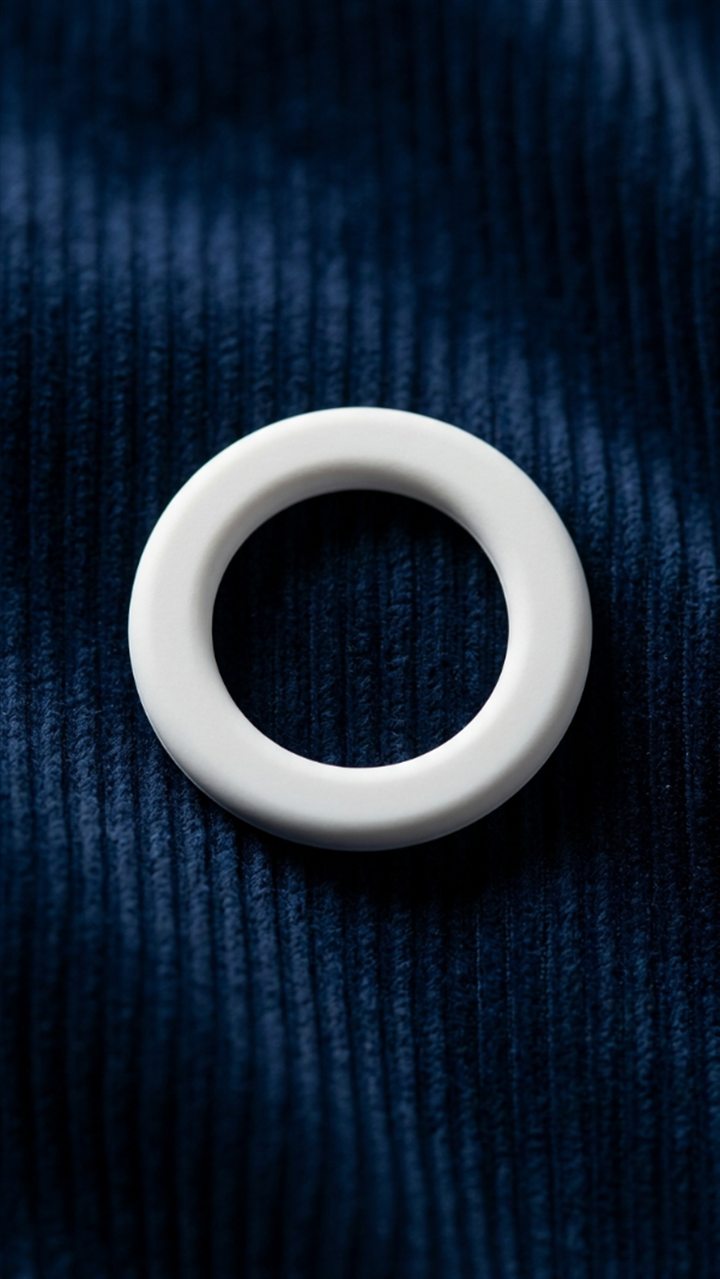
  6. White rubber on blue corduroy
  7. Deep deboss in leather
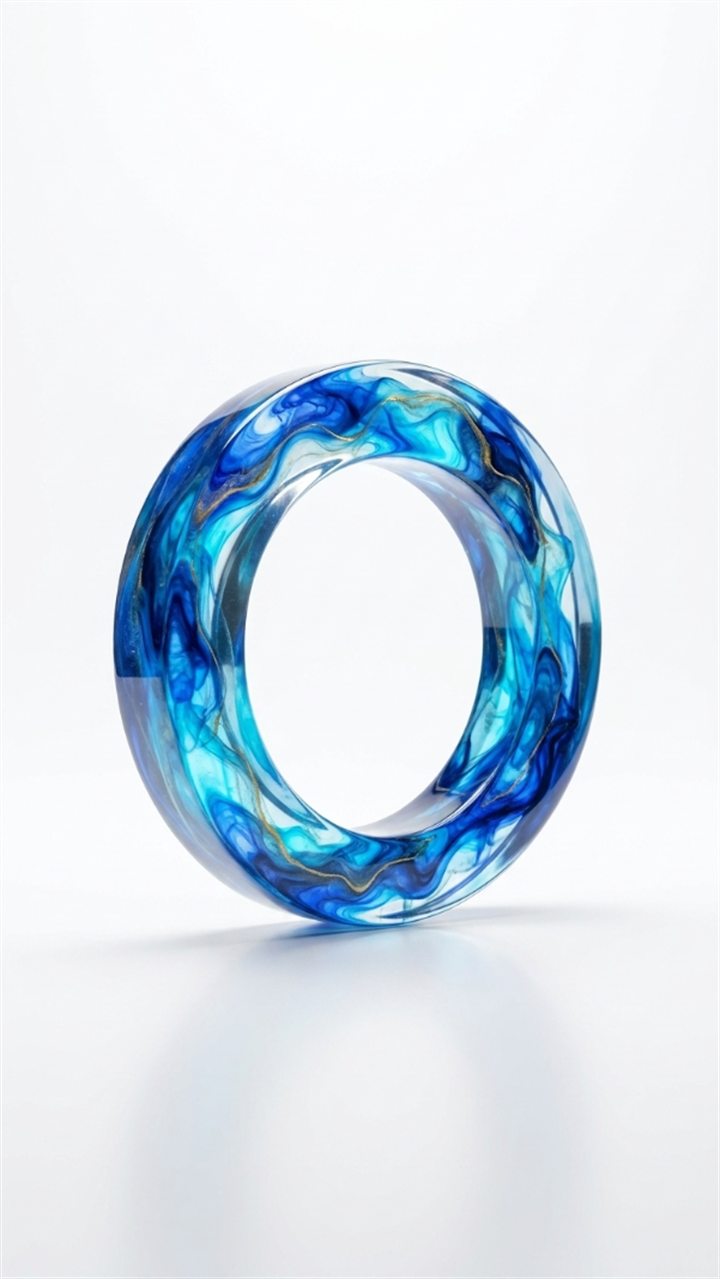
  8. Marbled blue resin
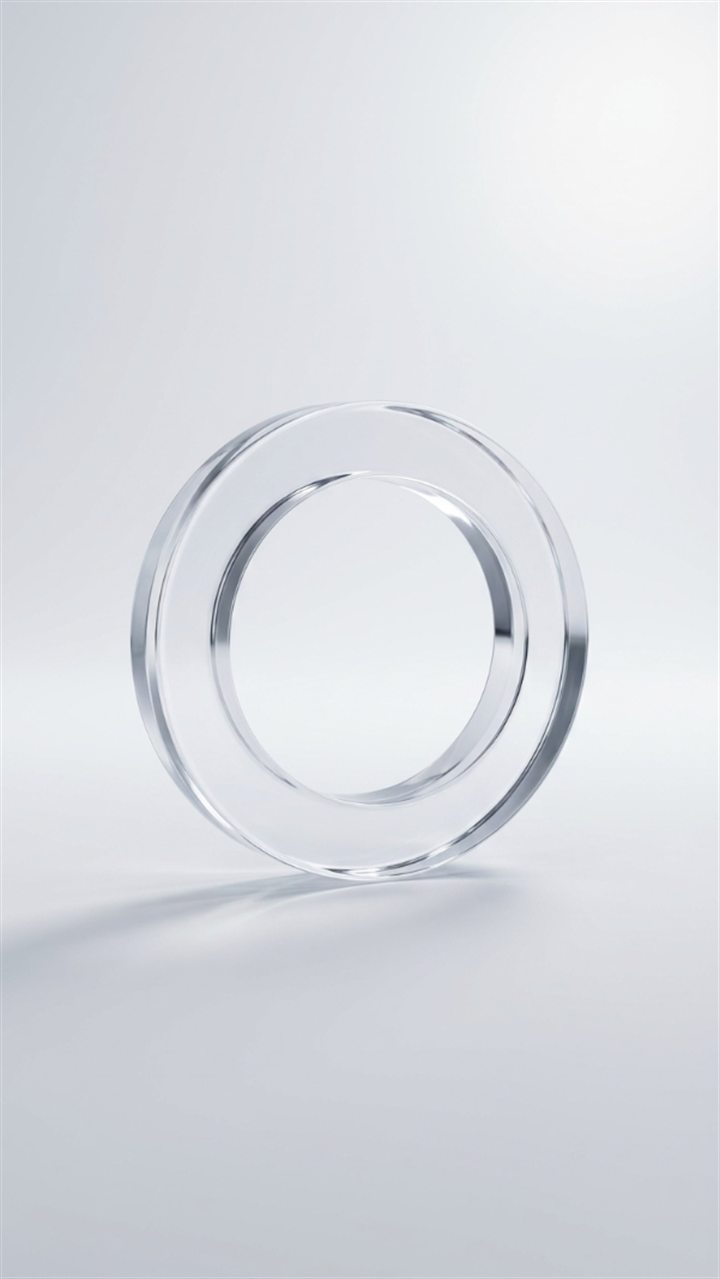
  9. Clear optical crystal
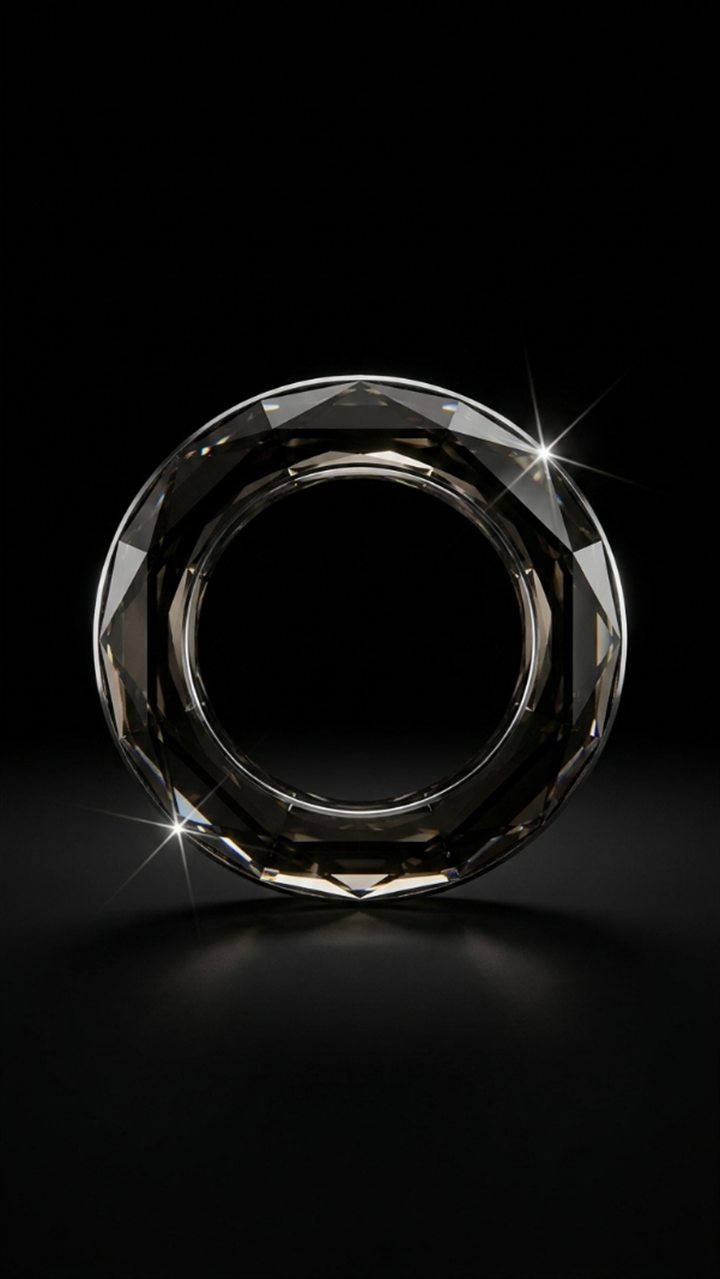
  10. Faceted black crystal
  11. White embroidery on green fabric
  12. Blue metal floating in the sky
  13. Graphite stone among wet rocks
  14. Terracotta on autumn leaves
  15. Walnut wood on moss
  16. Volcanic stone and black gravel
  17. Living coral in turquoise water
  18. Natural moss on bark
  19. Bronze metal mesh
  20. Concrete on a blue-gray wall
  21. Aged copper with patina
  22. Terracotta clay on a warm wall
  23. Weathered driftwood on the beach
  24. Ivory linen on black fabric
  25. Stone monument in the mountains
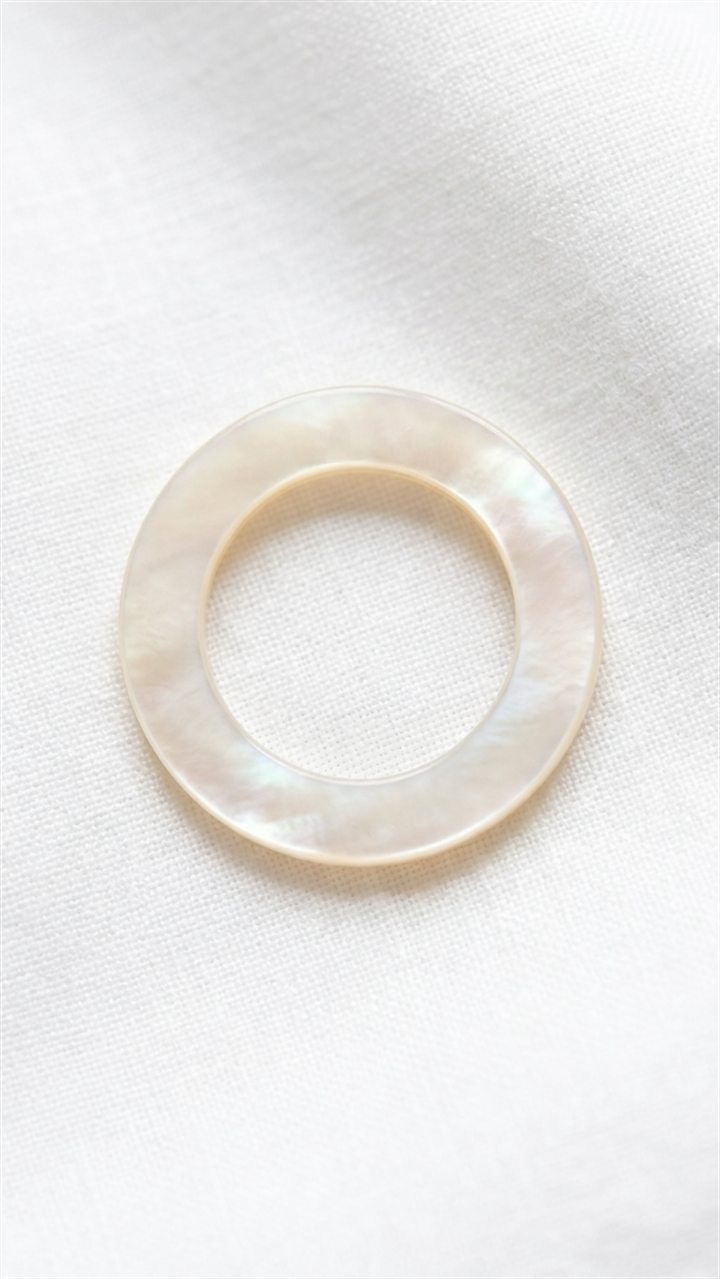
  26. Mother-of-pearl on white linen
  27. Monumental carving in sandstone
  28. Final identity reveal

THE COLLECTION

The 28 prompts

Each one is ready to copy and paste. Attach your logo as a reference image before generating.

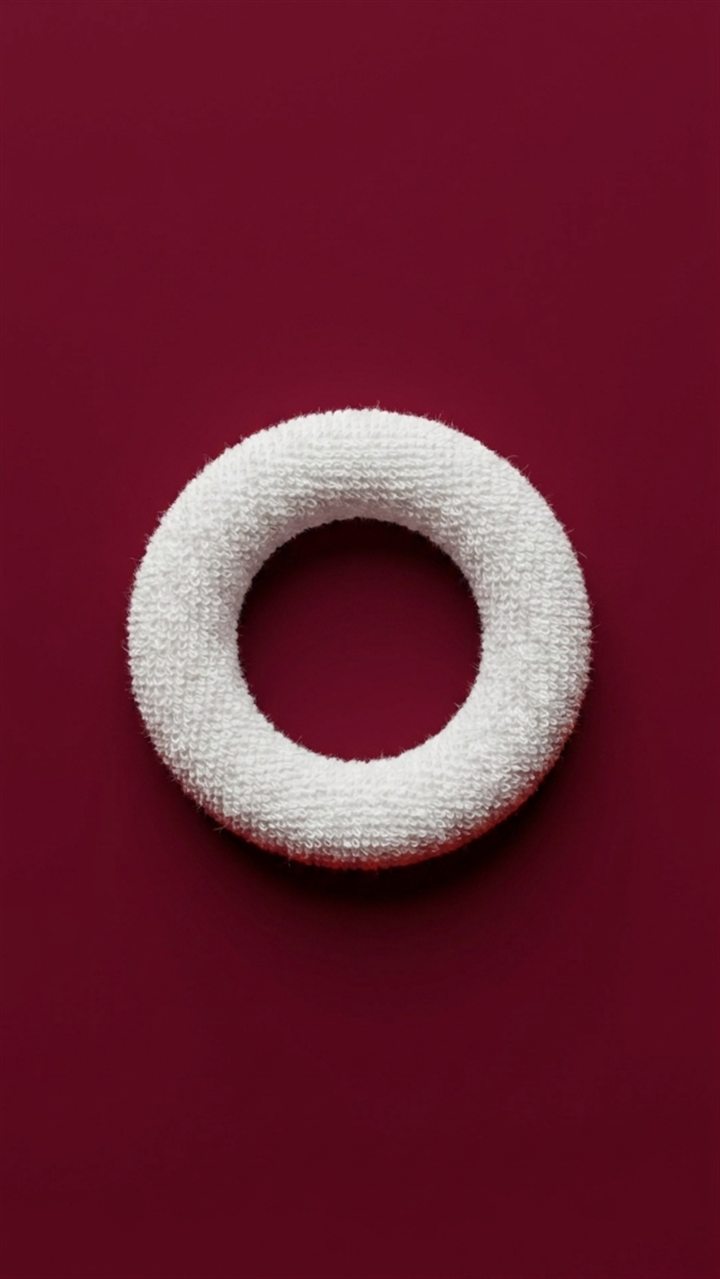
The OpenSyntheAI ring in white terry cloth on crimson

SCENE 01

White terry cloth on crimson

Prompt
Create a premium photorealistic vertical editorial image using the attached logo or brand symbol as the exact visual reference.

LOGO FIDELITY:
Isolate the attached logo from its surrounding background and treat that background as transparent. Preserve the logo's exact silhouette, proportions, orientation, negative spaces, stroke or shape thickness, internal geometry, edge relationships, and every distinctive detail. Do not redesign, simplify, stylize, add, remove, stretch, rotate, mirror, or replace any part of the logo. The logo must remain immediately recognizable as the supplied brand symbol. Transform only its material and physical surface according to the scene below.

SCENE:
Recreate the logo as a softly padded three-dimensional object covered in dense white terry cloth and fine looped cotton fibers. The textile should feel clean, tactile, plush, and premium, with realistic microscopic loops, gentle rounded volume, subtle seams hidden along the outer edges, and natural fabric compression where the object touches the surface. Place it against a seamless deep burgundy-to-crimson background made from one continuous studio material. The background should be smooth and elegant, with a very subtle fine-grain texture and no visible horizon line.

COMPOSITION:
Vertical 9:16 frame. Place the logo precisely in the visual center, facing the camera, with generous negative space around it. The symbol should occupy approximately 35 percent of the frame width and remain fully visible. Use a straight-on or almost straight-on camera angle. Keep the composition minimal, balanced, refined, and suitable for a luxury brand campaign.

LIGHTING AND CAMERA:
Use soft diffused studio lighting from the upper left, a mild fill from the front, realistic ambient occlusion, and a delicate contact shadow directly beneath the object. Use an 85 mm product-photography look, shallow but controlled depth of field, crisp focus on the entire logo, natural tonal transitions, and no blown highlights.

OUTPUT:
Ultra-detailed photorealistic product photography, premium editorial art direction, exact vertical 9:16 ratio, 1080 × 1920 pixels or higher, maximum available quality, clean color grading, realistic fibers, sharp logo geometry.

NEGATIVE CONSTRAINTS:
No text, letters, wordmark, slogan, new icons, extra symbols, duplicate logos, altered geometry, warped proportions, missing details, closed negative spaces, fuzzy silhouette, excessive fur, visible stitching across the face, hands, people, props, hard reflections, glossy plastic, bevelled redesign, watermark, border, frame, signature, or AI artifacts.

The OpenSyntheAI ring in logo formed in golden sand

SCENE 02

Logo formed in golden sand

Prompt
Create a premium photorealistic vertical image using the attached logo or brand symbol as an immutable shape reference.

LOGO FIDELITY:
Remove the surrounding background from the reference and preserve the exact silhouette, proportions, orientation, negative spaces, stroke or shape thickness, internal geometry, curvature, angles, and distinctive details of the supplied logo. Do not reinterpret or redesign it. Do not add, remove, merge, split, rotate, mirror, stretch, or simplify any component. Only convert the existing logo geometry into the physical material described below.

SCENE:
Form the complete logo naturally from compacted golden desert sand, as if the symbol had emerged from the ground in one precise continuous shape. The sand structure should have believable height, gently rounded upper surfaces, crisp recognizable edges, minute grains, subtle erosion, tiny wind trails, and a few loose particles scattered immediately around the base. Place it on an expansive field of warm fine sand with delicate wind-sculpted ripples. The environment should feel quiet, minimal, sunlit, and cinematic, without dunes or objects distracting from the logo.

COMPOSITION:
Vertical 9:16 frame. Center the logo in the lower-middle portion of the image, fully visible and viewed from a high three-quarter angle that still preserves its exact readable geometry. The symbol should occupy about 40 percent of the frame width. Leave generous clean sand above and around it. Maintain a simple editorial composition with no clutter.

LIGHTING AND CAMERA:
Use warm low-angle early-morning sunlight entering from the upper left, creating long soft shadows that reveal the relief without distorting the silhouette. Add realistic global illumination, fine granular detail, subtle atmospheric warmth, and natural tonal variation. Use a 50 mm photographic look with deep enough focus to keep the entire logo sharp.

OUTPUT:
High-end photorealistic environmental product photography, exact vertical 9:16 ratio, 1080 × 1920 pixels or higher, maximum resolution, refined warm color grade, crisp sand texture, precise logo fidelity.

NEGATIVE CONSTRAINTS:
No text, letters, wordmark, additional icons, different symbol, footprints, people, animals, plants, buildings, tools, strong dunes, excessive scattered debris, melted edges, collapsed geometry, distorted openings, asymmetrical redesign, printed logo, colored paint, watermark, frame, border, signature, or AI artifacts.
The OpenSyntheAI ring in white sculpture on grass

SCENE 03

White sculpture on grass

Prompt
Create a clean premium photorealistic vertical campaign image based on the attached logo or brand symbol.

LOGO FIDELITY:
Treat the attached logo as an exact immutable blueprint. Isolate it from its current background and preserve its original silhouette, proportions, orientation, negative spaces, thickness, internal geometry, edge contours, and all distinctive details. Do not redesign, simplify, smooth away, add to, remove from, rotate, mirror, stretch, compress, or replace the symbol. Convert only the original shape into a physical sculpture.

SCENE:
Recreate the logo as a solid freestanding sculpture made of flawless white matte ceramic with an extremely subtle satin finish. The object should have believable depth, gently softened physical edges without changing the outline, and a stable base hidden naturally among fresh green grass blades. Place it upright in a luminous open meadow beneath a clear pale-blue sky with a few soft white clouds. The grass should be natural, healthy, finely detailed, and slightly uneven, with a gentle breeze suggested in the surrounding blades while the sculpture remains perfectly still.

COMPOSITION:
Vertical 9:16 frame. Position the logo precisely in the center, facing directly toward the camera, occupying approximately 38 percent of the frame width. Use a low eye-level camera placed close to the grass so the sculpture feels iconic and monumental while remaining fully visible. Keep the horizon low and leave abundant sky as negative space.

LIGHTING AND CAMERA:
Use bright but soft late-morning daylight, a clean key light from the upper left, subtle natural shadowing in the grass, and a restrained contact shadow at the base. Use a 70 mm editorial lens look, crisp focus on the logo, softly receding meadow, realistic sky exposure, and neutral color balance.

OUTPUT:
Premium photorealistic brand photography, vertical 9:16, 1080 × 1920 pixels or higher, maximum detail, clean white material, realistic grass, refined minimalist art direction.

NEGATIVE CONSTRAINTS:
No text, wordmark, slogan, extra symbols, duplicate objects, altered logo shape, broken geometry, closed negative spaces, floating sculpture, pedestal, people, animals, flowers covering the logo, buildings, dramatic mountains, fantasy effects, chrome, plastic gloss, dirt stains, heavy shadows, lens flare, watermark, border, signature, or AI artifacts.
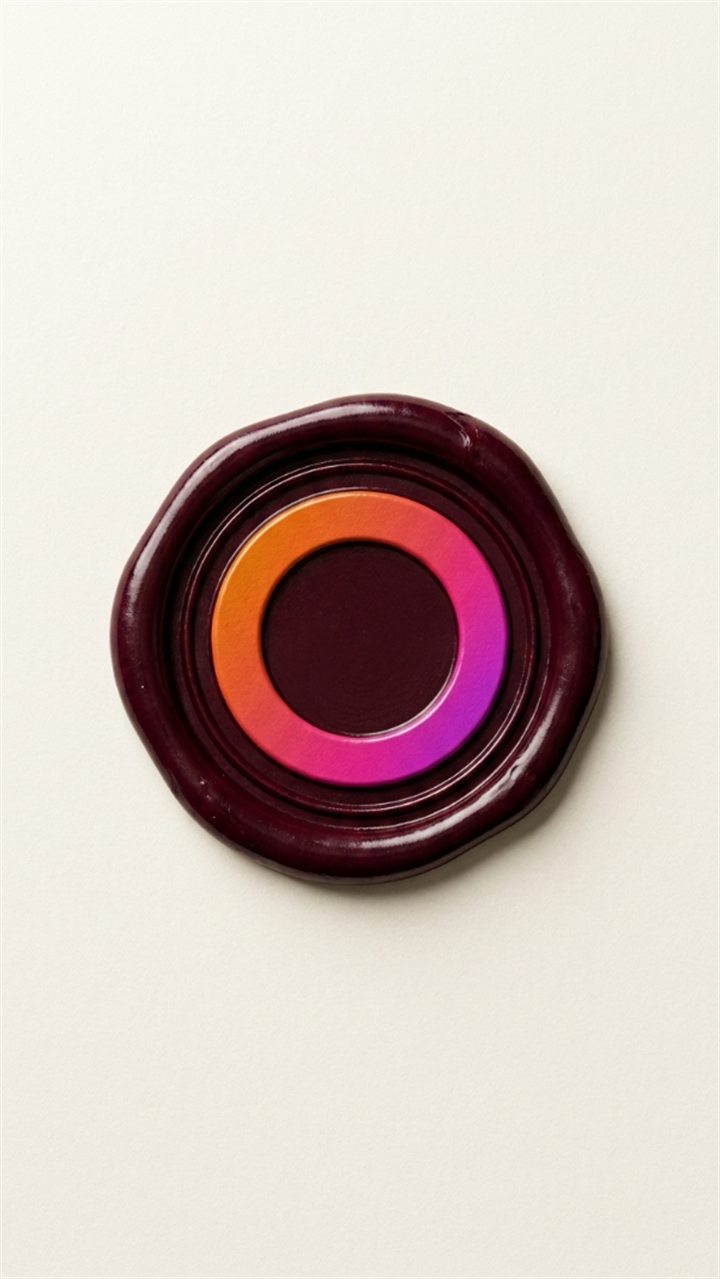
The OpenSyntheAI ring in burgundy wax seal

SCENE 04

Burgundy wax seal

Prompt
Create an elegant macro product photograph using the attached logo or brand symbol as the exact reference.

LOGO FIDELITY:
Preserve the supplied logo's exact silhouette, proportions, orientation, negative spaces, line or shape thickness, internal structure, and distinctive details. Treat the reference background as transparent. Do not redraw, reinterpret, simplify, merge, separate, add, remove, mirror, rotate, stretch, or deform any portion of the logo. The impression in the wax must reproduce the original symbol precisely.

SCENE:
Create a circular pool of deep burgundy sealing wax on warm ivory cotton paper. Press the exact logo deeply and cleanly into the center of the wax as a recessed embossed impression. The wax should have naturally irregular outer edges, subtle thickness, realistic cooled ripples, tiny surface variations, and a restrained satin sheen. The logo impression should be crisp, deep enough to cast delicate internal shadows, and perfectly readable. The paper should show refined tactile fibers and a slight warm texture, with no printed content.

COMPOSITION:
Vertical 9:16 macro frame. Center the wax seal slightly above the middle of the image, with generous untouched paper surrounding it. The seal should occupy approximately 36 percent of the frame width. Use a near-overhead camera angle with a very slight perspective that reveals the wax thickness while keeping the logo geometry undistorted.

LIGHTING AND CAMERA:
Use soft directional window light from the upper left, gentle shadow falloff, realistic ambient occlusion inside the debossed logo, and a subtle warm bounce from the paper. Use a 90 mm macro lens look, high micro-detail, sharp focus across the full seal, and delicate depth separation in the surrounding paper.

OUTPUT:
Luxury stationery photography, photorealistic, vertical 9:16, 1080 × 1920 pixels or higher, maximum detail, elegant warm color grade, precise wax and paper textures.

NEGATIVE CONSTRAINTS:
No letters, wordmark, handwriting, printed text, envelope address, additional seals, ribbon, stamp handle, hands, decorative plants, altered logo geometry, shallow unreadable impression, raised logo instead of recessed impression, excessive melting, glossy plastic wax, metallic gold, watermark, border, signature, or AI artifacts.
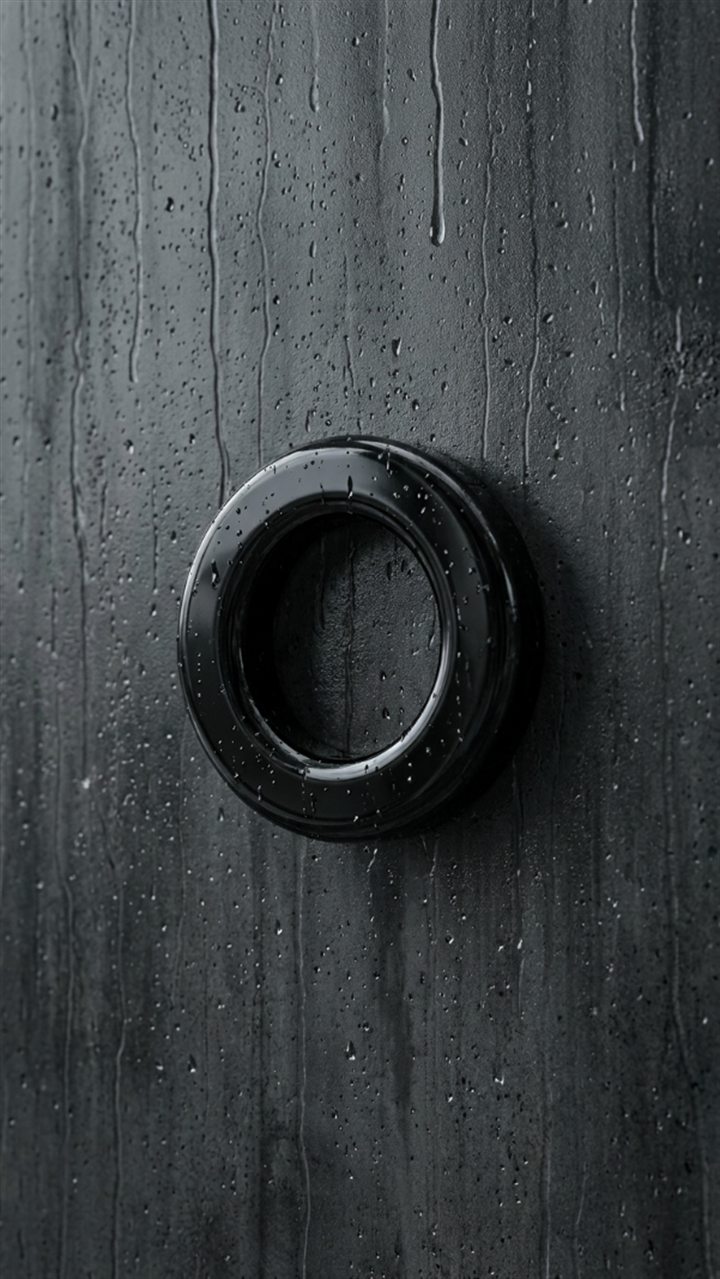
The OpenSyntheAI ring in obsidian on wet concrete

SCENE 05

Obsidian on wet concrete

Prompt
Create a dark cinematic photorealistic product image using the attached logo or brand symbol as the immutable geometry reference.

LOGO FIDELITY:
Isolate the supplied symbol from its background and preserve the exact silhouette, proportions, orientation, negative spaces, thickness, internal geometry, edge relationships, and unique identifying details. Do not redesign, simplify, rotate, mirror, stretch, compress, add, subtract, fracture, or replace any part. Convert only the existing geometry into the material described below.

SCENE:
Recreate the logo as a solid polished black obsidian object resting flat on wet dark-gray architectural concrete. The material should appear dense and stone-like, with a nearly black core, subtle smoky mineral depth, restrained polished reflections, minute natural imperfections, and a few tiny water droplets on the upper surface. The concrete should be saturated by recent rain, finely textured, and marked by soft irregular moisture patches. Include a thin natural film of water and a very faint reflection immediately beneath the logo.

COMPOSITION:
Vertical 9:16 frame. Center the logo in the image and show it from a high three-quarter angle that clearly preserves its exact shape. The object should occupy around 40 percent of the frame width. Leave broad areas of dark concrete around it for a minimal, sophisticated, high-contrast composition.

LIGHTING AND CAMERA:
Use a large soft light from the upper left, a narrow cool rim light along selected edges, deep but detailed shadows, realistic contact shadow, and controlled reflections that never obscure the silhouette. Use a 70 mm product lens look, precise focus across the logo, shallow atmospheric falloff in the background, and cinematic charcoal color grading.

OUTPUT:
Ultra-premium photorealistic material study, vertical 9:16, 1080 × 1920 pixels or higher, maximum available quality, crisp stone and water detail, refined dark editorial aesthetic.

NEGATIVE CONSTRAINTS:
No text, wordmark, additional icons, duplicate logos, altered shape, broken pieces, sharp spikes not present in the reference, closed openings, liquid logo, black plastic, mirror chrome, excessive glare, neon light, colored glow, large puddle, rain falling, hands, people, props, watermark, frame, border, signature, or AI artifacts.
The OpenSyntheAI ring in white rubber on blue corduroy

SCENE 06

White rubber on blue corduroy

Prompt
Create a refined tactile photorealistic vertical image using the attached logo or brand symbol as the exact shape reference.

LOGO FIDELITY:
Treat the attached symbol as an immutable blueprint. Remove its surrounding background and preserve the precise silhouette, proportions, orientation, negative spaces, shape thickness, internal geometry, corners, curves, and distinctive details. Do not redesign, simplify, round away identifying features, add, remove, rotate, mirror, stretch, compress, or substitute anything. Change only the material and physical setting.

SCENE:
Recreate the logo as a solid soft-touch object made from clean white matte silicone or premium molded rubber. Give it believable shallow depth and subtly softened physical edges while preserving the exact front-facing outline. Place it flat on rich midnight-blue corduroy fabric. The corduroy should feature narrow vertical ribs, fine textile fibers, natural folds far from the logo, and slight compression directly beneath the object. The white material must remain neutral and clean, with a fine velvety surface rather than shiny plastic.

COMPOSITION:
Vertical 9:16 frame. Center the logo precisely, facing upward and photographed from almost directly overhead. It should occupy approximately 38 percent of the frame width. Align the corduroy ribs vertically to reinforce the composition. Leave generous blue negative space and keep all folds subtle so the symbol remains the only focal point.

LIGHTING AND CAMERA:
Use a broad diffused studio light from the upper left, mild front fill, soft realistic contact shadow, and delicate ambient occlusion. Use an 85 mm macro product-photography look, sharp focus on the logo and nearby fabric ribs, smooth falloff toward the edges, and accurate white balance.

OUTPUT:
Photorealistic tactile brand photography, vertical 9:16, 1080 × 1920 pixels or higher, maximum detail, luxurious textile texture, clean minimal art direction, exact logo geometry.

NEGATIVE CONSTRAINTS:
No text, letters, wordmark, extra symbols, duplicate logos, warped geometry, altered proportions, missing details, excessive bevel, inflatable appearance, glossy plastic, ceramic, metallic material, dirt, colored logo, patterned fabric, buttons, seams crossing the logo, hands, objects, watermark, frame, border, signature, or AI artifacts.
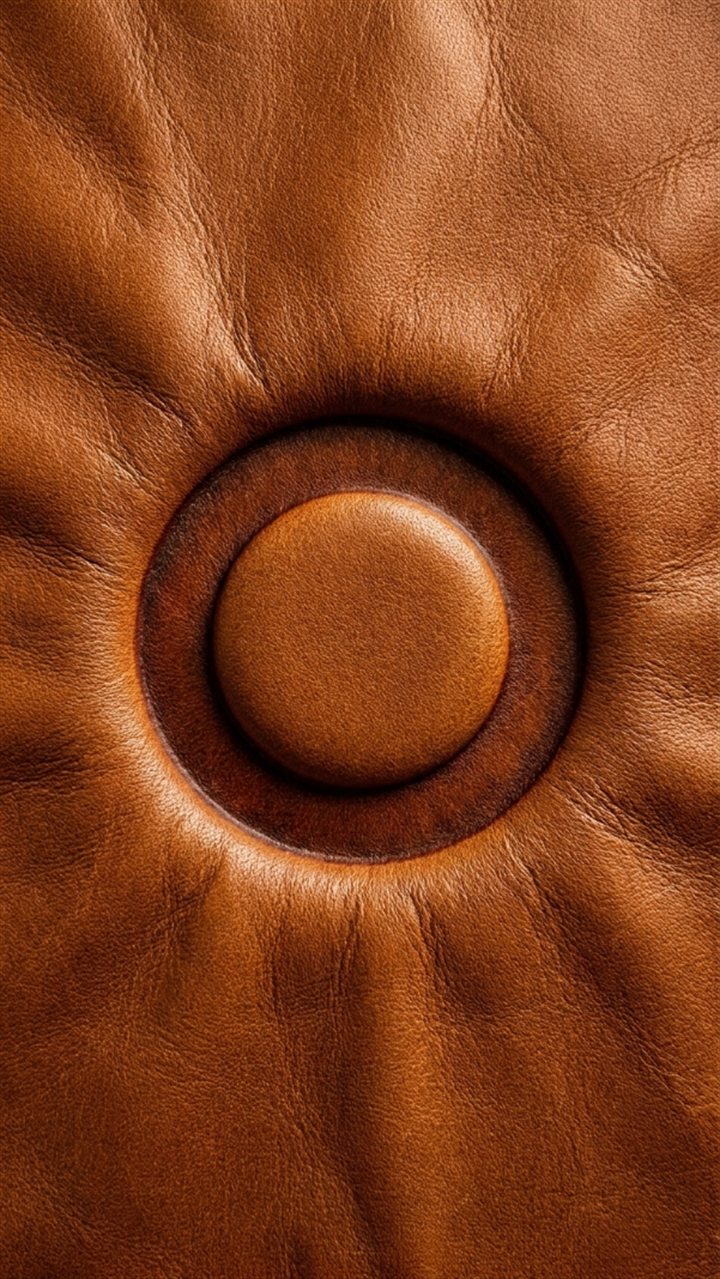
The OpenSyntheAI ring in deep deboss in leather

SCENE 07

Deep deboss in leather

Prompt
Create a premium macro photograph of the attached logo or brand symbol deeply debossed into leather.

LOGO FIDELITY:
Use the attached symbol as an exact, immutable die shape. Treat the surrounding reference background as transparent and preserve the original silhouette, proportions, orientation, negative spaces, line or shape thickness, internal geometry, and every distinctive detail. Do not redraw, simplify, embellish, add, remove, rotate, mirror, stretch, compress, or replace any portion. The leather impression must match the supplied logo exactly.

SCENE:
Press the logo deeply into a seamless sheet of warm caramel-brown full-grain leather. The mark should be a physically recessed heat-pressed impression with crisp contours, realistic depth, gently darkened compressed fibers along the interior walls, and a subtle smoother sheen inside the debossed areas. The surrounding leather should show fine pores, natural grain, slight tonal variation, and restrained handcrafted character. Do not place a separate object on the leather; the logo must be formed directly within the material.

COMPOSITION:
Vertical 9:16 frame. Center the debossed symbol slightly above the middle, occupying approximately 42 percent of the frame width. Use an overhead camera with a small oblique angle so the depth of the impression is visible without distorting the design. Keep the leather seamless and fill the entire frame with it.

LIGHTING AND CAMERA:
Use warm raking light from the upper left to reveal the recessed depth and leather grain, soft frontal fill to retain shadow detail, and smooth falloff toward the lower right. Use a 100 mm macro lens look with extremely crisp texture and even focus across the logo.

OUTPUT:
Luxury leather-goods campaign photography, highly photorealistic, vertical 9:16, 1080 × 1920 pixels or higher, maximum micro-detail, refined warm grading, precise brand fidelity.

NEGATIVE CONSTRAINTS:
No text, letters, wordmark, stitches, zipper, belt, bag, hands, tools, extra symbols, raised applique, separate logo object, burned black outline, excessive scorching, altered geometry, shallow unreadable mark, closed negative spaces, synthetic plastic leather, glossy varnish, watermark, border, signature, or AI artifacts.
The OpenSyntheAI ring in marbled blue resin

SCENE 08

Marbled blue resin

Prompt
Create a luminous high-end studio product image using the attached logo or brand symbol as the exact geometry reference.

LOGO FIDELITY:
Isolate the supplied logo from its background and preserve the precise silhouette, proportions, orientation, negative spaces, thickness, internal geometry, curves, angles, and identifying details. Do not redesign, simplify, add, remove, rotate, mirror, stretch, distort, melt, or replace the symbol. Convert only the original geometry into a translucent resin object.

SCENE:
Recreate the logo as a freestanding polished translucent resin sculpture containing elegant internal swirls of cobalt blue, cyan, navy, clear resin, and very restrained hairline accents of warm gold. The colored veins should flow organically through the material without hiding the outline or internal negative spaces. The resin should have realistic optical depth, mild internal refraction, crisp polished edges, tiny suspended variations, and a premium hand-cast appearance. Place it upright on a seamless white-to-light-gray studio surface with a clean white background.

COMPOSITION:
Vertical 9:16 frame. Center the logo, facing the camera with only a very slight three-quarter turn to reveal physical depth while maintaining perfect recognizability. The sculpture should occupy approximately 38 percent of the frame width. Leave generous white negative space and a subtle grounding reflection below.

LIGHTING AND CAMERA:
Use a large diffused key light from the upper left, soft backlight passing through the resin, gentle front fill, and a delicate rim highlight. Use a 75 mm product-photography lens look, sharp focus across the entire symbol, controlled caustics, clean highlight rolloff, and bright editorial color grading.

OUTPUT:
Ultra-detailed photorealistic resin art photography, vertical 9:16, 1080 × 1920 pixels or higher, maximum quality, realistic translucency and refraction, precise logo geometry.

NEGATIVE CONSTRAINTS:
No text, wordmark, additional symbols, duplicate logo, altered silhouette, missing pieces, closed negative spaces, excessive deformation, liquid splash, melting, random protrusions, opaque paint, dominant gold, glitter, bubbles covering details, pedestal, hands, props, harsh shadow, colored background, watermark, frame, signature, or AI artifacts.
The OpenSyntheAI ring in clear optical crystal

SCENE 09

Clear optical crystal

Prompt
Create a minimalist luxury studio photograph using the attached logo or brand symbol as an immutable reference.

LOGO FIDELITY:
Preserve the exact supplied silhouette, proportions, orientation, negative spaces, shape thickness, internal geometry, edge alignment, and distinctive details. Remove the reference background and do not redesign, simplify, add, subtract, rotate, mirror, stretch, compress, warp, or replace any element. Convert the original logo geometry into flawless transparent optical crystal while keeping it fully recognizable.

SCENE:
Recreate the logo as a solid freestanding sculpture made from exceptionally clear optical crystal. The object should have believable physical depth, precisely polished surfaces, subtly softened real-world edges that do not change the front outline, realistic refraction, faint prismatic dispersion, and tiny controlled highlights. Place it upright on a seamless pale-white to very light-gray studio surface. The background should remain pure, luminous, sophisticated, and free of visual clutter. Use only delicate optical effects so the transparent symbol remains easy to read.

COMPOSITION:
Vertical 9:16 frame. Center the logo exactly, facing almost directly forward with a minimal three-quarter angle to reveal depth. It should occupy roughly 36 percent of the frame width. Leave abundant white negative space. Include a faint contact shadow and a restrained clear reflection immediately beneath the sculpture.

LIGHTING AND CAMERA:
Use broad diffused side lighting, a soft white backlight, black and white studio cards reflected subtly in the crystal edges, and controlled caustics on the surface. Use an 85 mm luxury-product lens look, crisp edge focus, deep enough focus for the entire symbol, and clean high-key exposure without losing the transparent outline.

OUTPUT:
Premium photorealistic crystal product photography, vertical 9:16, 1080 × 1920 pixels or higher, maximum detail, precise optical behavior, bright minimalist art direction, exact brand geometry.

NEGATIVE CONSTRAINTS:
No text, letters, wordmark, extra icons, duplicate objects, altered geometry, thick colored glass, blue tint, cracked crystal, broken edges, missing details, closed openings, ice texture, frosted material, exaggerated rainbow, fantasy glow, pedestal, hands, props, harsh black shadow, watermark, border, signature, or AI artifacts.
The OpenSyntheAI ring in faceted black crystal

SCENE 10

Faceted black crystal

Prompt
Create a dramatic luxury product photograph using the attached logo or brand symbol as the exact immutable geometry.

LOGO FIDELITY:
Isolate the logo from the reference background and preserve its precise silhouette, proportions, orientation, negative spaces, thickness, internal geometry, angles, curves, and every distinctive feature. Do not redesign, simplify, add, remove, rotate, mirror, stretch, compress, fracture, or substitute any component. Surface faceting may change reflections, but it must never change the logo's outer or inner shape.

SCENE:
Recreate the logo as a solid sculpture made from dark smoky crystal, black diamond-like glass, and subtle graphite translucency. Apply refined shallow facets across the front and side surfaces, creating elegant angular reflections while preserving the exact geometry. Place the sculpture upright on a matte-black studio surface against a seamless black background. Add only a few tiny star-like specular highlights at natural facet intersections. The material should feel rare, dense, polished, and sophisticated rather than metallic or plastic.

COMPOSITION:
Vertical 9:16 frame. Center the logo, facing mostly forward with a slight three-quarter turn that reveals depth. It should occupy approximately 40 percent of the frame width. Use generous black negative space and ensure the entire silhouette remains separated from the background by controlled edge light.

LIGHTING AND CAMERA:
Use narrow softboxes from the upper left and right to trace selected edges, a restrained frontal fill for internal detail, and a subtle cool rim light. Keep the background deep black while retaining separation. Use a 90 mm luxury-jewelry lens look, precise sharp focus, deep controlled contrast, and clean highlight rolloff.

OUTPUT:
Ultra-premium photorealistic black-crystal photography, vertical 9:16, 1080 × 1920 pixels or higher, maximum quality, cinematic contrast, detailed facets, exact logo fidelity.

NEGATIVE CONSTRAINTS:
No text, wordmark, new icons, duplicate logo, altered silhouette, random spikes, broken pieces, missing details, closed negative spaces, mirror chrome, glossy black plastic, opaque flat stone, excessive glitter, galaxy effects, neon glow, colored beams, smoke, pedestal, jewelry setting, hands, watermark, border, signature, or AI artifacts.
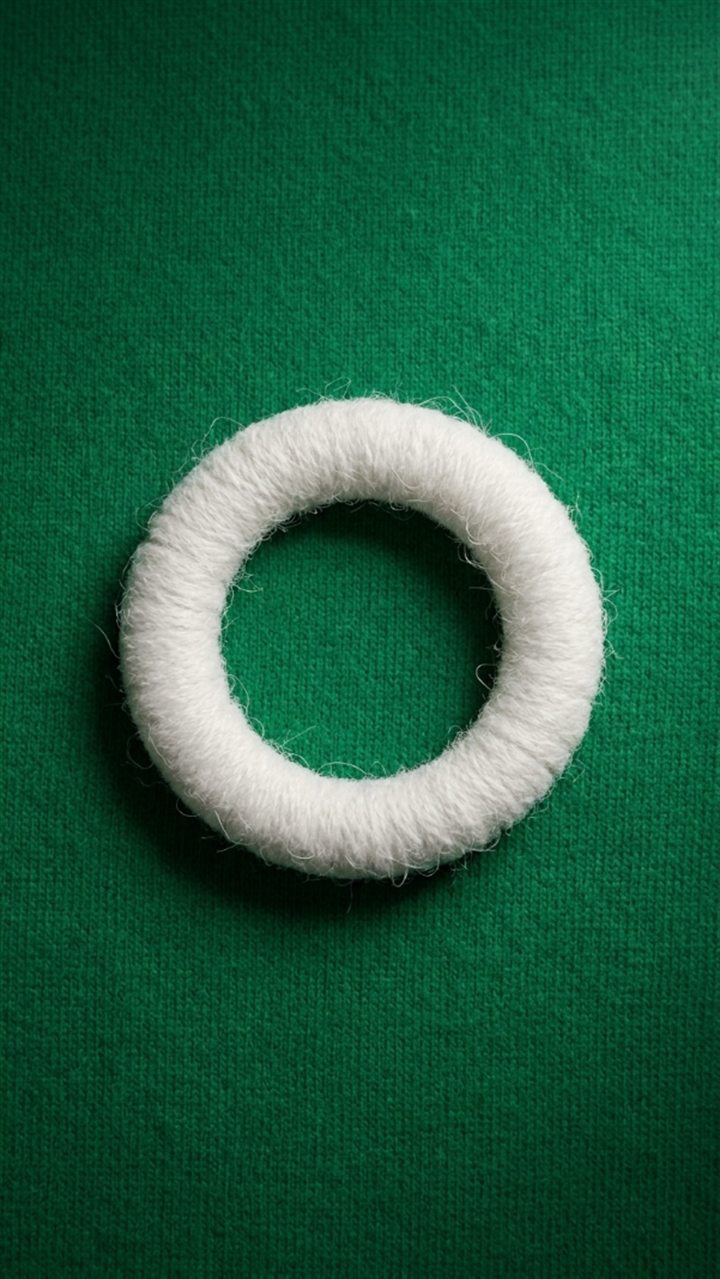
The OpenSyntheAI ring in white embroidery on green fabric

SCENE 11

White embroidery on green fabric

Prompt
Create a premium textile macro image using the attached logo or brand symbol as the exact embroidery pattern.

LOGO FIDELITY:
Treat the supplied symbol as an immutable pattern. Isolate it from the original background and preserve the exact silhouette, proportions, orientation, negative spaces, thickness, internal geometry, edge relationships, and distinctive details. Do not redraw, simplify, add, remove, rotate, mirror, stretch, compress, or replace any element. The embroidered construction must follow the original logo precisely.

SCENE:
Build the logo as a raised white embroidered and tufted textile applique attached to a rich emerald-green woven fabric. Use dense white wool loops, fine cotton threads, and subtle variations in fiber direction to create a soft dimensional surface. The applique should have believable thickness, clean boundaries, a discreet stitched edge, and natural compression where it meets the base cloth. The green textile should show refined woven fibers, a faint directional grain, and gentle undulations far from the logo.

COMPOSITION:
Vertical 9:16 frame. Photograph from almost directly overhead and center the logo precisely. It should occupy about 38 percent of the frame width. Keep the green fabric filling the entire background, with generous uncluttered space and no seam crossing the symbol.

LIGHTING AND CAMERA:
Use broad soft light from the upper left, subtle front fill, realistic ambient occlusion around the applique edge, and a soft contact shadow. Use a 100 mm macro textile-photography look, crisp detail in individual fibers, even focus across the logo, and rich but natural green color.

OUTPUT:
High-end photorealistic textile campaign image, vertical 9:16, 1080 × 1920 pixels or higher, maximum micro-detail, tactile fibers, clean editorial composition, precise logo shape.

NEGATIVE CONSTRAINTS:
No text, letters, wordmark, additional patches, duplicate symbols, altered geometry, loose threads obscuring the outline, fuzzy unreadable edges, shaggy fur, excessive thickness, printed ink, plastic material, buttons, clothing seams, hands, objects, patterned background, watermark, border, signature, or AI artifacts.
The OpenSyntheAI ring in blue metal floating in the sky

SCENE 12

Blue metal floating in the sky

Prompt
Create a surreal yet photorealistic vertical brand image using the attached logo or symbol as the immutable geometry reference.

LOGO FIDELITY:
Preserve the exact silhouette, proportions, orientation, negative spaces, shape thickness, internal geometry, corners, curves, and all distinctive details of the attached symbol. Treat its background as transparent. Do not redesign, simplify, add, remove, rotate, mirror, stretch, compress, bend, or replace any part. Convert only the existing geometry into a physical metal sculpture.

SCENE:
Recreate the logo as a solid pale-blue hammered-metal sculpture floating peacefully in an open sky. The metal should have a refined satin finish, subtle hand-hammered dimples, faint silver-blue tonal variation, realistic thickness, and restrained highlights. Surround it with a luminous pale-blue atmosphere and a few soft white cumulus clouds at different depths. The logo should appear weightless but completely stable, with no visible support, strings, platform, or propulsion.

COMPOSITION:
Vertical 9:16 frame. Center the logo in the upper-middle area, facing the camera with only a tiny three-quarter rotation to reveal depth. The symbol should occupy approximately 34 percent of the frame width. Leave abundant sky around it and position clouds so they never overlap important geometry or negative spaces.

LIGHTING AND CAMERA:
Use clean daylight from the upper left, soft sky fill, a delicate bright rim on selected edges, and subtle atmospheric perspective. Use a 70 mm editorial lens look, sharp focus on the logo, gently softened distant clouds, natural sky exposure, and airy pastel color grading.

OUTPUT:
Premium photorealistic conceptual brand photography, exact vertical 9:16 ratio, 1080 × 1920 pixels or higher, maximum detail, realistic hammered metal, cinematic but minimal sky.

NEGATIVE CONSTRAINTS:
No text, wordmark, extra symbols, duplicate logo, altered silhouette, missing details, closed negative spaces, wings, balloons, ropes, pedestal, aircraft, birds, people, fantasy portal, lightning, sunset, strong lens flare, chrome mirror finish, rust, neon glow, motion blur, watermark, frame, signature, or AI artifacts.
The OpenSyntheAI ring in graphite stone among wet rocks

SCENE 13

Graphite stone among wet rocks

Prompt
Create a moody photorealistic environmental product photograph using the attached logo or brand symbol as the exact shape reference.

LOGO FIDELITY:
Isolate the supplied logo from its background and preserve its precise silhouette, proportions, orientation, negative spaces, thickness, internal geometry, contours, and unique details. Do not redesign, simplify, add, remove, rotate, mirror, stretch, compress, erode away, or replace any component. Natural stone texture may affect the surface only; the geometry must remain exact.

SCENE:
Recreate the logo as a dense dark graphite stone object resting among smooth wet river pebbles at the edge of very shallow water. The stone should have a charcoal-gray mineral surface, subtle layered grain, slightly worn physical edges that still preserve the exact outline, scattered water droplets, and a restrained wet sheen. Surround it with rounded black, gray, and slate pebbles of varied sizes. A thin sheet of clear water may flow gently between the stones without covering the logo.

COMPOSITION:
Vertical 9:16 frame. Place the logo precisely in the center, viewed from a high three-quarter angle so its complete shape and physical depth are visible. It should occupy approximately 36 percent of the frame width and remain clearly separated from the surrounding rocks. Keep the environment natural but carefully composed, with no clutter over the symbol.

LIGHTING AND CAMERA:
Use soft overcast daylight, a subtle cool highlight from the upper left, realistic wet reflections, gentle contact shadow, and delicate ambient occlusion. Use a 70 mm environmental macro lens look with crisp focus on the logo and nearby stones, gradual depth-of-field falloff, and restrained cool-gray grading.

OUTPUT:
High-end photorealistic nature and material photography, vertical 9:16, 1080 × 1920 pixels or higher, maximum texture detail, realistic water, precise logo fidelity.

NEGATIVE CONSTRAINTS:
No text, wordmark, additional symbols, duplicate logo, altered geometry, cracked or broken symbol, moss covering the logo, excessive mud, deep water, large waves, fish, plants covering details, hands, people, artificial pedestal, glossy plastic, polished marble, colored glow, watermark, border, signature, or AI artifacts.
The OpenSyntheAI ring in terracotta on autumn leaves

SCENE 14

Terracotta on autumn leaves

Prompt
Create a warm cinematic photorealistic still-life image using the attached logo or brand symbol as the exact geometry reference.

LOGO FIDELITY:
Treat the attached symbol as an immutable blueprint. Remove the reference background and preserve the original silhouette, proportions, orientation, negative spaces, shape thickness, internal geometry, curves, angles, and every distinctive detail. Do not redesign, simplify, add, subtract, rotate, mirror, stretch, compress, chip away, or replace any component. Transform only its material.

SCENE:
Recreate the logo as a solid handcrafted object made from warm burnt-orange terracotta with subtle aged-copper undertones. The surface should display fine clay pores, gentle tonal variations, tiny natural speckles, lightly worn physical edges that do not alter the silhouette, and a soft matte finish. Rest it on a dense bed of dry autumn maple leaves in burnt orange, amber, ochre, copper, and deep brown. The leaves should feel crisp and realistic, with visible veins and curled edges, while never obscuring the symbol.

COMPOSITION:
Vertical 9:16 frame. Center the logo and photograph it from a high three-quarter angle. The symbol should occupy approximately 38 percent of the frame width. Arrange the leaves organically around the object, keeping its entire outline and all negative spaces unobstructed. Maintain a rich, editorial still-life composition.

LIGHTING AND CAMERA:
Use warm late-afternoon light from the upper left, gentle fill from the front, soft realistic shadowing between leaves, and delicate highlights on raised clay texture. Use a 75 mm lens look, sharp focus on the logo, gradual falloff across the surrounding leaves, and sophisticated autumn color grading.

OUTPUT:
Premium photorealistic seasonal brand photography, vertical 9:16, 1080 × 1920 pixels or higher, maximum detail, tactile clay and leaf textures, exact logo geometry.

NEGATIVE CONSTRAINTS:
No text, letters, wordmark, extra icons, duplicate symbol, altered proportions, broken logo, missing details, closed negative spaces, leaves covering the logo, pumpkins, candles, hands, people, animals, forest landscape, metallic mirror finish, bright red plastic, excessive rust, smoke, watermark, frame, signature, or AI artifacts.
The OpenSyntheAI ring in walnut wood on moss

SCENE 15

Walnut wood on moss

Prompt
Create an atmospheric premium forest photograph using the attached logo or brand symbol as an immutable shape reference.

LOGO FIDELITY:
Preserve the exact supplied silhouette, proportions, orientation, negative spaces, thickness, internal geometry, curves, angles, and unique identifying details. Isolate the logo from its current background. Do not redesign, simplify, add, remove, rotate, mirror, stretch, compress, bend, carve new details, or replace any part. Wood grain and natural texture must remain confined to the existing geometry.

SCENE:
Recreate the logo as a freestanding sculpture carved from dark walnut wood. The object should feature rich brown grain, subtle growth lines following the material naturally, a refined hand-finished matte surface, realistic thickness, and gently softened physical edges without changing the front-facing outline. Place it upright on a lush forest floor covered with vivid green moss, tiny ferns, damp bark fragments, and a few delicate leaves. The setting should feel peaceful, premium, and naturally humid.

COMPOSITION:
Vertical 9:16 frame. Center the logo in the lower-middle area, facing almost directly toward the camera. It should occupy about 36 percent of the frame width. Use a low eye-level perspective that makes the sculpture feel iconic while keeping the full silhouette visible. Frame it with soft greenery but do not allow plants to overlap important details.

LIGHTING AND CAMERA:
Use diffused forest light filtering from the upper left, faint volumetric atmosphere in the distant background, subtle warm highlights on the walnut grain, realistic contact shadow, and soft green bounce light. Use an 85 mm lens look, crisp focus on the logo, creamy background bokeh, and natural cinematic color grading.

OUTPUT:
High-end photorealistic environmental brand photography, vertical 9:16, 1080 × 1920 pixels or higher, maximum detail, realistic wood and moss, refined forest atmosphere, exact logo fidelity.

NEGATIVE CONSTRAINTS:
No text, wordmark, extra symbols, duplicate logo, altered shape, tree-ring redesign, broken wood, missing pieces, vines covering the symbol, mushrooms on the logo, fantasy creatures, people, hands, buildings, pedestal, glossy varnish, plastic, glowing runes, heavy fog, excessive sun rays, watermark, border, signature, or AI artifacts.
The OpenSyntheAI ring in volcanic stone and black gravel

SCENE 16

Volcanic stone and black gravel

Prompt
Create a stark monochromatic photorealistic material study using the attached logo or brand symbol as the exact immutable geometry.

LOGO FIDELITY:
Isolate the attached symbol from its background and preserve its precise silhouette, proportions, orientation, negative spaces, shape thickness, internal geometry, edge relationships, and every distinguishing detail. Do not redesign, simplify, add, remove, rotate, mirror, stretch, compress, fracture, melt, or substitute any part. Natural volcanic texture may affect only the surface.

SCENE:
Recreate the logo as a solid object made from matte charcoal volcanic stone with a dense, fine-grained basalt surface. Include tiny natural pores, restrained mineral speckles, shallow irregularities, and slightly weathered physical edges that never change the recognizable outline. Place it flat among a field of black volcanic gravel, small angular basalt fragments, and fine dark ash. The logo should remain visibly distinct through scale, controlled lighting, and a slightly smoother surface than the surrounding ground.

COMPOSITION:
Vertical 9:16 frame. Center the logo precisely and photograph it from a high three-quarter angle. It should occupy approximately 40 percent of the frame width. Fill the entire background with dark volcanic material while maintaining a clean separation around the outline and all internal negative spaces.

LIGHTING AND CAMERA:
Use a narrow soft light from the upper left, delicate cool rim lighting, deep detailed shadows, and subtle ambient occlusion between the object and gravel. Use a 75 mm product lens look, sharp focus across the symbol, gradual texture falloff toward the frame edges, and refined monochromatic charcoal grading.

OUTPUT:
Premium photorealistic material photography, vertical 9:16, 1080 × 1920 pixels or higher, maximum micro-detail, sophisticated black-on-black contrast, exact logo geometry.

NEGATIVE CONSTRAINTS:
No text, wordmark, additional symbols, duplicate logo, distorted shape, broken pieces, missing details, closed negative spaces, glowing lava, red or orange light, fire, smoke plume, mountain eruption, glossy obsidian, plastic, metallic surface, excessive dust covering the logo, hands, people, watermark, border, signature, or AI artifacts.
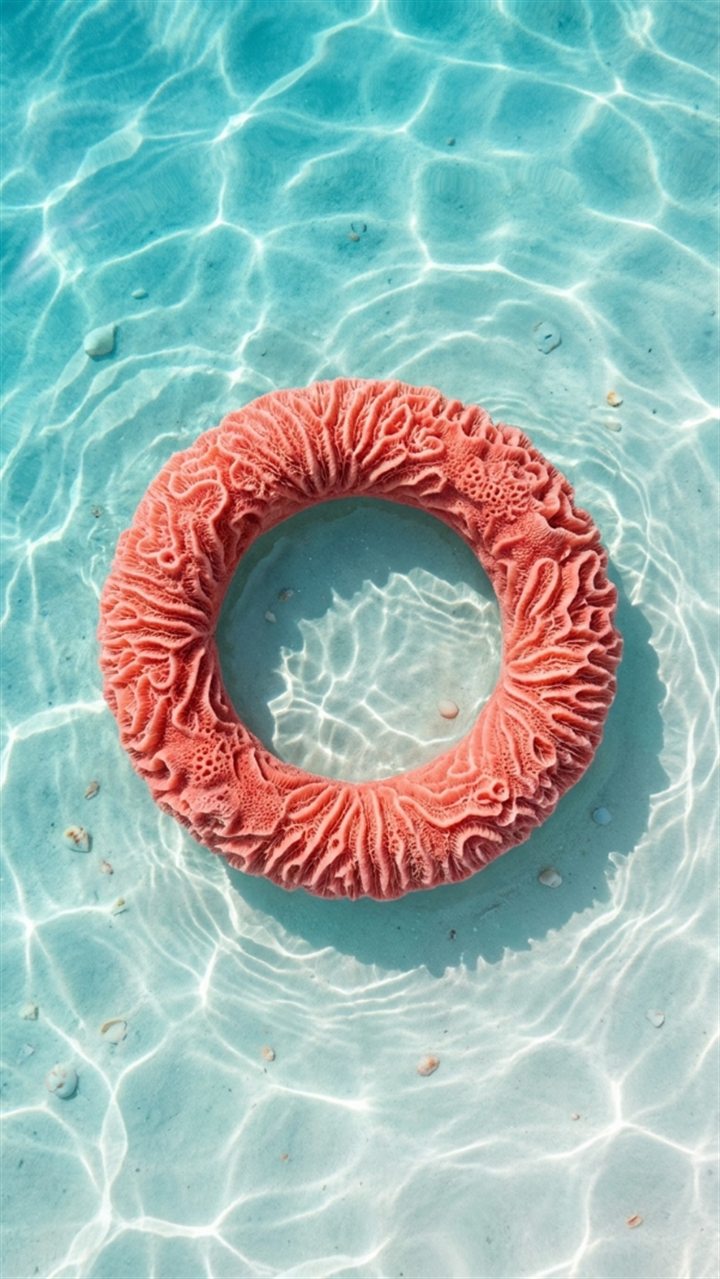
The OpenSyntheAI ring in living coral in turquoise water

SCENE 17

Living coral in turquoise water

Prompt
Create a vibrant photorealistic tropical brand image using the attached logo or brand symbol as an immutable geometry reference.

LOGO FIDELITY:
Preserve the exact silhouette, proportions, orientation, negative spaces, thickness, internal geometry, curves, angles, and distinctive details of the supplied symbol. Treat the original background as transparent. Do not redesign, simplify, add, remove, rotate, mirror, stretch, compress, distort, or replace any part. Organic coral texture may grow only across the existing surfaces and must never change the logo's geometry.

SCENE:
Recreate the logo as a solid vivid coral-pink to warm red marine-coral sculpture resting in very shallow crystal-clear turquoise water over fine white sand. Cover the surface with dense, small, rounded coral polyps and delicate natural organic texture while keeping the outline crisp and readable. The water should create gentle sunlit ripples, realistic caustic patterns, and a slight refracted shadow on the sand. The logo must remain above or just beneath the water surface, fully visible and unobstructed.

COMPOSITION:
Vertical 9:16 frame. Center the logo precisely and use a near-overhead camera angle with a slight perspective that reveals physical depth. It should occupy about 38 percent of the frame width. Leave clear turquoise water and white sand around it, with no other coral formations competing for attention.

LIGHTING AND CAMERA:
Use bright tropical midday sunlight softened by water, realistic moving caustics, luminous aqua bounce light, gentle specular highlights, and crisp but natural shadows on the sand. Use a 65 mm editorial lens look, sharp focus on the full logo, high clarity, and fresh premium color grading.

OUTPUT:
Ultra-detailed photorealistic marine product photography, vertical 9:16, 1080 × 1920 pixels or higher, maximum quality, realistic water optics and coral texture, exact logo fidelity.

NEGATIVE CONSTRAINTS:
No text, wordmark, additional icons, duplicate logo, altered silhouette, branching growth outside the shape, missing details, closed negative spaces, fish, shells covering the logo, seaweed, hands, swimmers, deep ocean, large waves, foam obscuring the symbol, cartoon coral, plastic texture, neon glow, watermark, frame, signature, or AI artifacts.
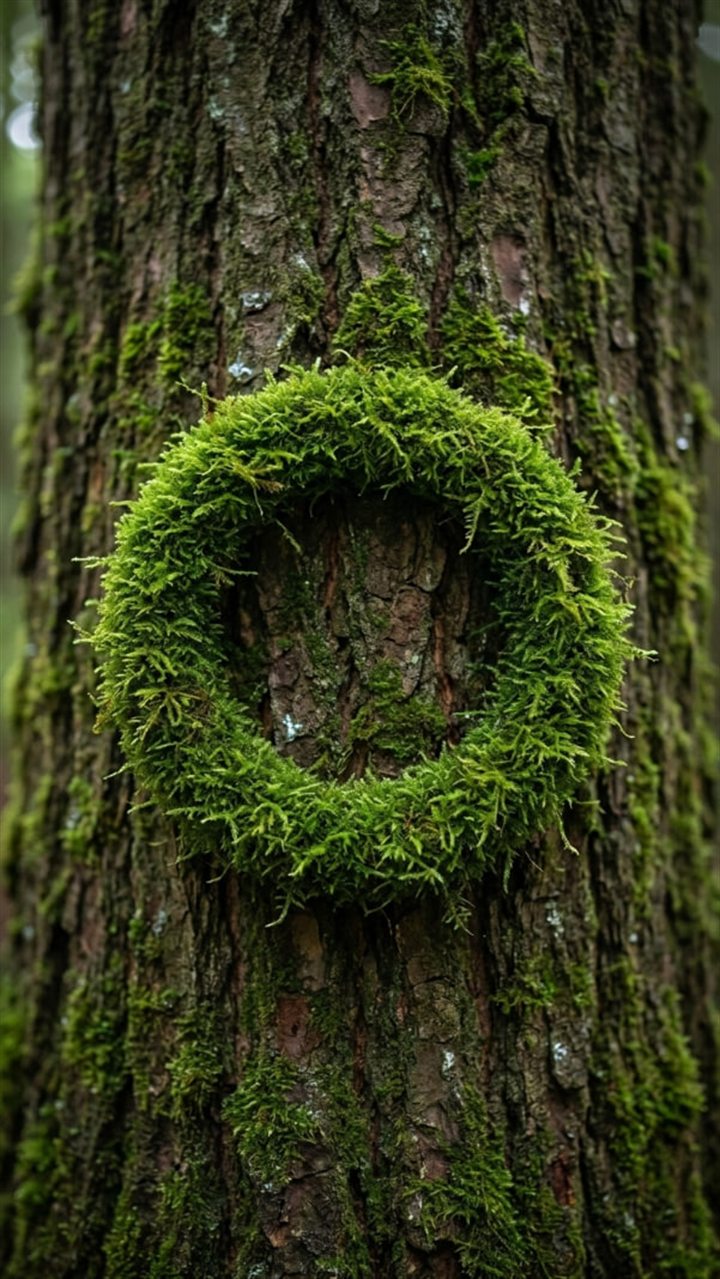
The OpenSyntheAI ring in natural moss on bark

SCENE 18

Natural moss on bark

Prompt
Create a highly detailed photorealistic nature macro image using the attached logo or brand symbol as the exact growth pattern.

LOGO FIDELITY:
Use the supplied logo as an immutable stencil. Preserve the exact silhouette, proportions, orientation, negative spaces, shape thickness, internal geometry, edge contours, and every distinctive detail. Treat the reference background as transparent. Do not redesign, simplify, add, remove, rotate, mirror, stretch, compress, merge, or replace any component. Moss may grow within the original shape only and must not blur or expand its boundaries.

SCENE:
Form the exact logo from dense, vivid green living moss growing naturally on the deeply textured bark of a mature tree. The moss should be lush, velvety, varied in height, and composed of tiny realistic fronds in emerald, forest green, and fresh lime highlights. The logo should appear integrated with the bark yet remain sharply defined, with clean negative spaces revealing the brown bark beneath. Add only a few microscopic moisture droplets and subtle surrounding traces of natural lichen.

COMPOSITION:
Vertical 9:16 frame. Use a straight-on macro view of the tree trunk and place the moss logo precisely in the center. It should occupy approximately 42 percent of the frame width. The bark should fill the entire background, with its vertical cracks and natural grain creating a restrained frame around the symbol.

LIGHTING AND CAMERA:
Use soft diffused woodland light from the upper left, subtle moist highlights, gentle shadow depth between moss fibers, and natural warm bounce from the bark. Use a 100 mm macro lens look, extremely crisp detail on the logo, even focus across its complete geometry, and softly receding bark toward the edges.

OUTPUT:
Premium photorealistic botanical brand photography, vertical 9:16, 1080 × 1920 pixels or higher, maximum micro-detail, realistic moss and bark, exact logo geometry.

NEGATIVE CONSTRAINTS:
No text, letters, wordmark, extra icons, duplicate logo, altered proportions, overgrown fuzzy outline, moss filling negative spaces, vines, flowers, mushrooms covering the symbol, insects, hands, carved wood, painted green logo, artificial turf, fantasy glow, excessive water, watermark, border, signature, or AI artifacts.
The OpenSyntheAI ring in bronze metal mesh

SCENE 19

Bronze metal mesh

Prompt
Create a sophisticated dark photorealistic product image using the attached logo or brand symbol as the immutable geometry reference.

LOGO FIDELITY:
Isolate the supplied symbol from its surrounding background and preserve the exact silhouette, proportions, orientation, negative spaces, thickness, internal geometry, curvature, angles, and identifying details. Do not redesign, simplify, add, remove, rotate, mirror, stretch, compress, perforate through essential geometry, or replace any part. Convert only the existing form into the material described below.

SCENE:
Recreate the logo as a solid three-dimensional object made from dark bronze micro-perforated metal mesh. The front and side surfaces should display a precise field of tiny evenly spaced circular perforations, subtle copper highlights, deep bronze shadows, realistic thickness, and a refined satin-metal finish. Place the object flat on premium black woven fabric with a very fine diagonal texture. The metal should feel engineered, tactile, and luxurious rather than industrially rough.

COMPOSITION:
Vertical 9:16 frame. Center the logo precisely, viewed from a high three-quarter angle that reveals depth while preserving the symbol's readable shape. It should occupy approximately 39 percent of the frame width. Leave generous black negative space, and keep the fabric folds minimal and far from the logo.

LIGHTING AND CAMERA:
Use a narrow warm softbox from the upper left, subtle cool fill from the opposite side, delicate edge highlights, and deep realistic contact shadow. Use an 85 mm product lens look, crisp focus on the perforations and logo outline, controlled background falloff, and rich black-and-bronze color grading.

OUTPUT:
High-end photorealistic industrial-luxury brand photography, vertical 9:16, 1080 × 1920 pixels or higher, maximum material detail, controlled metallic reflections, exact logo fidelity.

NEGATIVE CONSTRAINTS:
No text, wordmark, new icons, duplicate logo, altered shape, missing details, closed negative spaces, oversized holes, random mesh deformation, rust, bright gold, mirror chrome, plastic, speaker device, buttons, cables, hands, props, neon glow, excessive reflections, watermark, frame, signature, or AI artifacts.

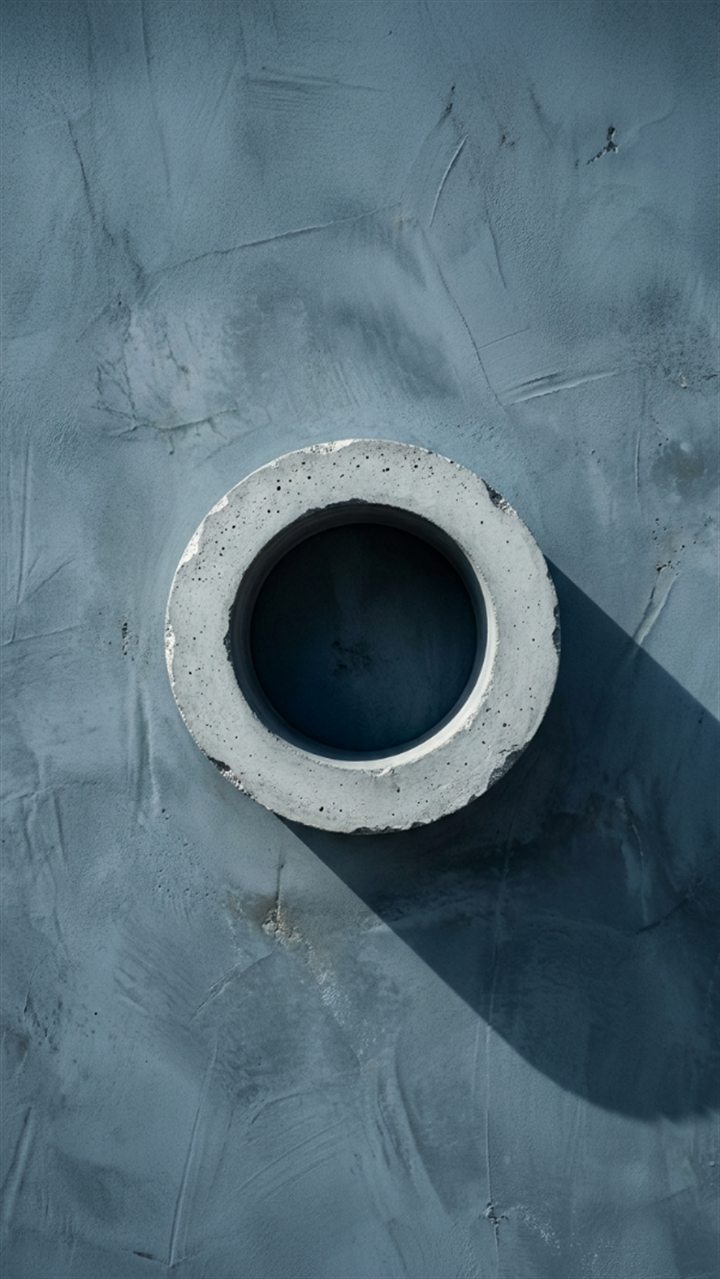
The OpenSyntheAI ring in concrete on a blue-gray wall

SCENE 20

Concrete on a blue-gray wall

Prompt
Create a minimalist architectural photorealistic image using the attached logo or brand symbol as the exact shape reference.

LOGO FIDELITY:
Treat the attached symbol as an immutable architectural template. Remove its current background and preserve the precise silhouette, proportions, orientation, negative spaces, shape thickness, internal geometry, edge relationships, and every distinctive detail. Do not redesign, simplify, add, remove, rotate, mirror, stretch, compress, crack apart, or replace any component. Material imperfections may affect the surface only.

SCENE:
Recreate the logo as a rough pale-gray cast-concrete relief mounted slightly away from a cold blue-gray plaster wall. The object should have believable depth, a fine cement grain, tiny aggregate speckles, shallow pores, restrained edge wear, and a matte mineral finish. The wall should show subtle trowel marks, soft tonal clouding, and a refined architectural texture. Maintain a narrow consistent gap between the concrete symbol and the wall so it casts a soft dimensional shadow.

COMPOSITION:
Vertical 9:16 frame. Place the logo in the exact center, facing directly toward the camera and occupying approximately 36 percent of the frame width. Use a straight-on architectural perspective with vertical lines kept perfectly straight. Leave abundant uncluttered wall around the logo.

LIGHTING AND CAMERA:
Use soft directional daylight from the upper left, creating a gentle offset shadow behind and below the object. Add mild front fill and realistic ambient occlusion. Use an 85 mm architectural-product lens look, sharp focus across the symbol and nearby wall texture, neutral perspective, and understated cool color grading.

OUTPUT:
Premium photorealistic architectural brand visualization, vertical 9:16, 1080 × 1920 pixels or higher, maximum detail, realistic concrete and plaster, exact logo geometry.

NEGATIVE CONSTRAINTS:
No text, letters, wordmark, signage, additional symbols, duplicate logo, distorted perspective, altered proportions, broken geometry, major cracks, exposed rebar, graffiti, plants, furniture, windows, people, harsh spotlight, glossy stone, metallic material, deep bevel redesign, watermark, border, signature, or AI artifacts.
The OpenSyntheAI ring in aged copper with patina

SCENE 21

Aged copper with patina

Prompt
Create a richly textured photorealistic product image using the attached logo or brand symbol as the immutable geometry reference.

LOGO FIDELITY:
Isolate the supplied logo from its background and preserve its exact silhouette, proportions, orientation, negative spaces, thickness, internal geometry, contours, and distinctive identifying details. Do not redesign, simplify, add, subtract, rotate, mirror, stretch, compress, corrode away essential parts, or replace the symbol. Oxidation must affect color and surface texture only.

SCENE:
Recreate the logo as a solid aged-copper object with a sophisticated mix of warm brown metal, darkened recesses, turquoise-green verdigris, and small traces of blue patina. The oxidation should appear naturally distributed along surface depressions and selected edges while leaving enough visible copper to create depth and richness. Place the object flat on weathered dark wooden boards with deep charcoal-brown grain, subtle cracks, and a matte dry finish. The logo must remain cleanly separated from the background.

COMPOSITION:
Vertical 9:16 frame. Center the logo and photograph it from a high three-quarter angle. It should occupy approximately 39 percent of the frame width. Align the wooden grain vertically or diagonally in a controlled way and leave generous dark negative space around the symbol.

LIGHTING AND CAMERA:
Use warm directional light from the upper left, restrained cool fill that enhances the patina, realistic contact shadow, and delicate metallic highlights. Use an 85 mm product-photography look, sharp focus across the logo, subtle falloff in the wood texture, and cinematic copper-and-teal grading without exaggeration.

OUTPUT:
Luxury photorealistic material study, vertical 9:16, 1080 × 1920 pixels or higher, maximum texture detail, realistic copper oxidation and wood grain, exact logo fidelity.

NEGATIVE CONSTRAINTS:
No text, wordmark, extra icons, duplicate logo, altered silhouette, missing details, closed negative spaces, corrosion holes, broken pieces, bright polished gold, mirror finish, green paint, fantasy glow, wet slime, plants covering the logo, tools, hands, nails, screws, watermark, frame, signature, or AI artifacts.
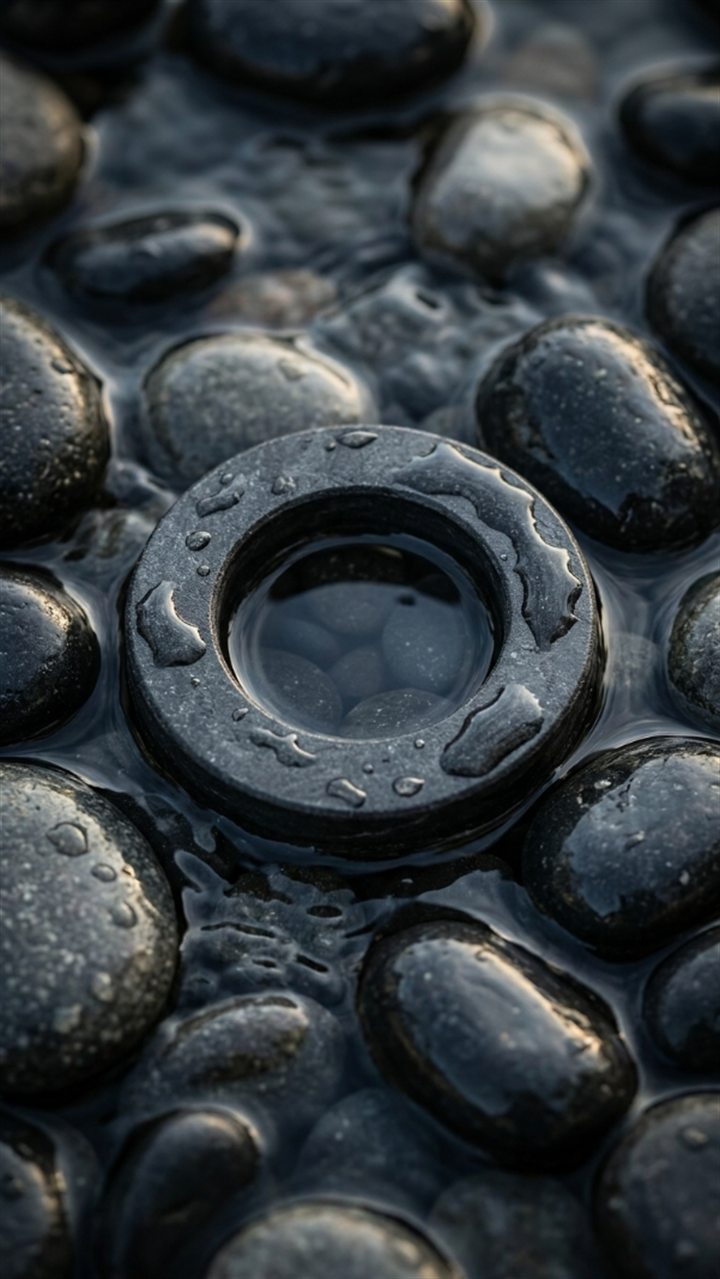
The OpenSyntheAI ring in terracotta clay on a warm wall

SCENE 22

Terracotta clay on a warm wall

Prompt
Create a warm Mediterranean-inspired photorealistic editorial image using the attached logo or brand symbol as the exact geometry reference.

LOGO FIDELITY:
Treat the supplied symbol as an immutable mold. Remove its surrounding reference background and preserve the original silhouette, proportions, orientation, negative spaces, shape thickness, internal geometry, curves, corners, and distinctive details. Do not redesign, simplify, add, remove, rotate, mirror, stretch, compress, crack, or replace any component. Convert only the existing form into terracotta.

SCENE:
Recreate the logo as a solid burnt-orange terracotta clay relief mounted on a warm beige lime-plaster wall. The clay should feature fine pores, subtle handmade variations, tiny mineral speckles, a matte sun-baked surface, and believable shallow depth. The plaster wall should feel soft, warm, and slightly irregular. Cast a clean but softly edged window-grid shadow diagonally across the wall, allowing portions of light and shadow to pass near the logo without hiding its shape.

COMPOSITION:
Vertical 9:16 frame. Center the logo slightly above the middle, facing directly toward the camera and occupying approximately 36 percent of the frame width. Keep the wall uncluttered. Position the window shadow as a secondary compositional element, with clear negative space and no physical window visible.

LIGHTING AND CAMERA:
Use warm late-afternoon sunlight from the upper left, soft reflected fill, realistic contact shadow behind the mounted logo, and gentle tonal gradients across the plaster. Use an 85 mm editorial lens look, straight architectural perspective, crisp focus on the logo, and refined beige-and-terracotta color grading.

OUTPUT:
Premium photorealistic architectural still life, vertical 9:16, 1080 × 1920 pixels or higher, maximum texture detail, natural sunlight, exact logo fidelity.

NEGATIVE CONSTRAINTS:
No text, letters, wordmark, extra icons, duplicate logo, altered geometry, closed negative spaces, broken clay, large cracks, painted logo, pottery vessel, furniture, plants, visible window, people, harsh black shadow over the entire symbol, plastic texture, glossy glaze, watermark, border, signature, or AI artifacts.
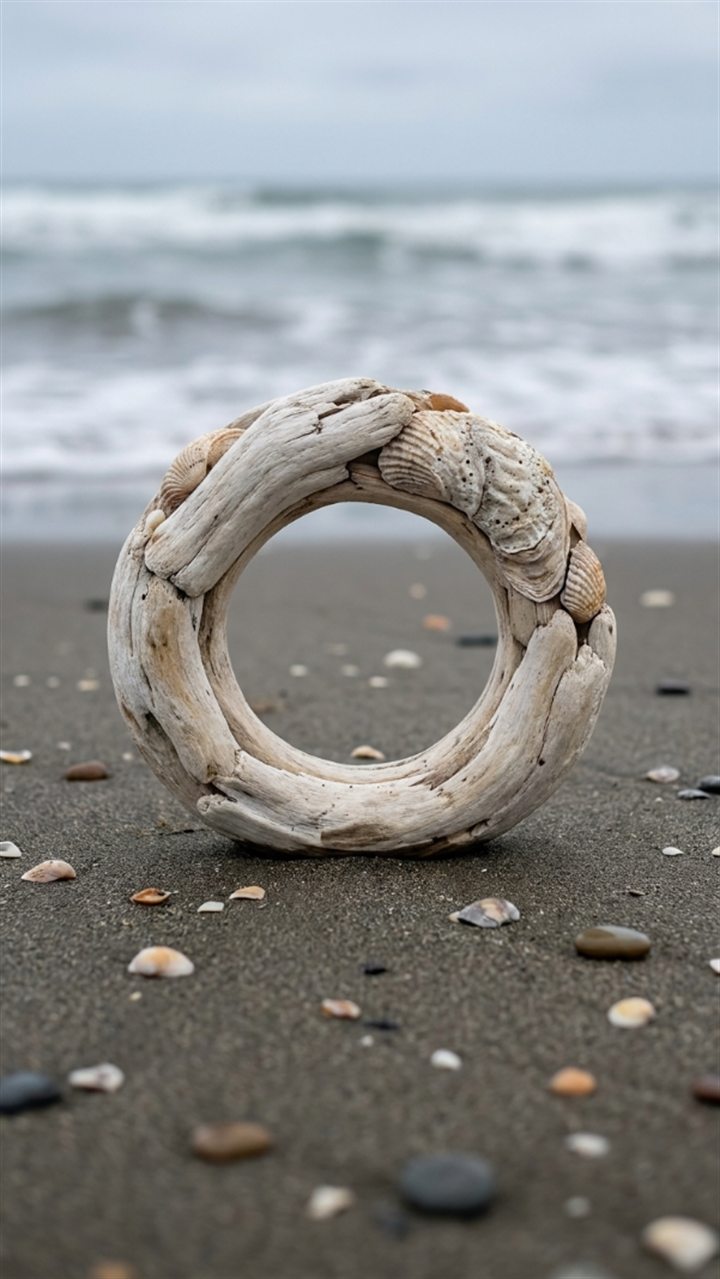
The OpenSyntheAI ring in weathered driftwood on the beach

SCENE 23

Weathered driftwood on the beach

Prompt
Create a serene coastal photorealistic brand image using the attached logo or brand symbol as an immutable shape reference.

LOGO FIDELITY:
Preserve the exact silhouette, proportions, orientation, negative spaces, thickness, internal geometry, edge relationships, and every distinctive detail of the attached symbol. Treat the reference background as transparent. Do not redesign, simplify, add, remove, rotate, mirror, stretch, compress, erode away key features, or replace any part. Natural weathering must remain superficial and cannot change the logo's geometry.

SCENE:
Recreate the logo as a solid object made from pale salt-weathered driftwood with subtle shell-like mineral texture. The surface should show bleached beige and ivory tones, fine wood grain, tiny salt crystals, shallow weathered grooves, and a dry matte finish. Place it upright or gently leaning on wet compact beach sand near the shoreline. Include a few small natural shells and smooth pebbles placed well away from the outline. A soft line of receding ocean foam may appear in the background without touching or obscuring the logo.

COMPOSITION:
Vertical 9:16 frame. Center the logo in the lower-middle area, facing almost directly toward the camera and occupying approximately 35 percent of the frame width. Use a low eye-level beach perspective with a softly blurred shoreline behind it. Preserve the full silhouette and all negative spaces.

LIGHTING AND CAMERA:
Use soft overcast coastal daylight, gentle cool sky fill, subtle warm reflection from the sand, realistic damp contact shadow, and restrained highlights on salt crystals. Use an 85 mm environmental lens look, crisp focus on the logo, shallow depth of field, and calm neutral coastal grading.

OUTPUT:
High-end photorealistic coastal brand photography, vertical 9:16, 1080 × 1920 pixels or higher, maximum detail, realistic driftwood, sand, and water, exact logo fidelity.

NEGATIVE CONSTRAINTS:
No text, wordmark, additional symbols, duplicate logo, altered shape, broken branches protruding from the outline, missing details, foam covering the symbol, large seashells, starfish, seaweed, people, birds, boats, sunset, storm, tropical props, glossy plastic, carved lettering, watermark, frame, signature, or AI artifacts.
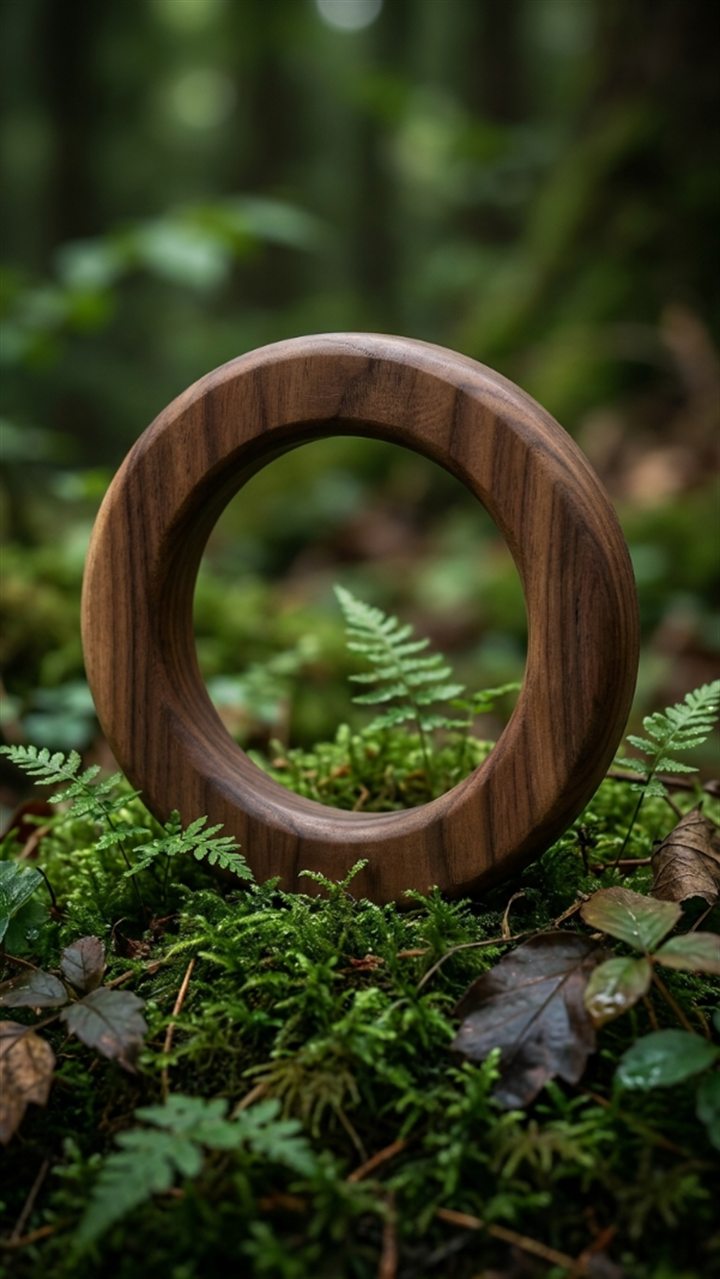
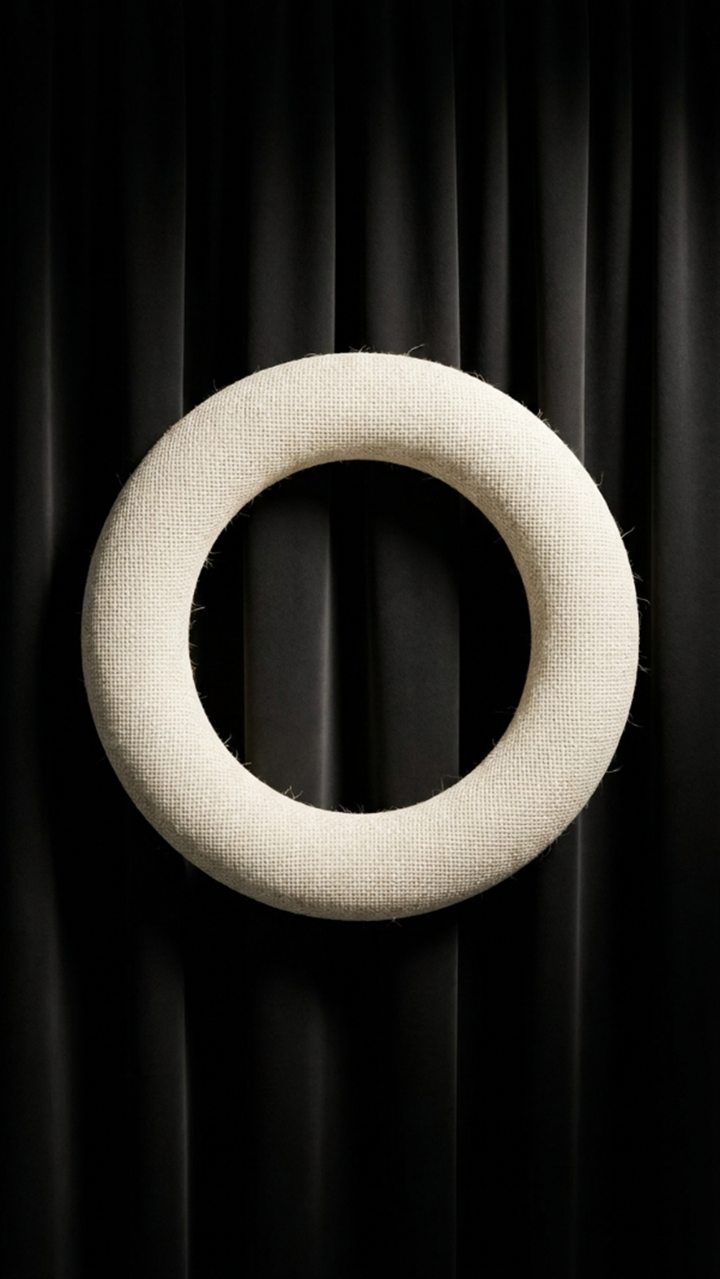
The OpenSyntheAI ring in ivory linen on black fabric

SCENE 24

Ivory linen on black fabric

Prompt
Create an elegant high-fashion photorealistic textile image using the attached logo or brand symbol as the exact geometry reference.

LOGO FIDELITY:
Isolate the attached symbol from its original background and preserve the precise silhouette, proportions, orientation, negative spaces, shape thickness, internal geometry, curves, angles, and identifying details. Do not redesign, simplify, add, remove, rotate, mirror, stretch, compress, over-round, or substitute any component. Convert only the existing shape into a padded textile object.

SCENE:
Recreate the logo as a softly padded object wrapped in premium ivory woven linen. The material should show delicate cross-woven fibers, a clean natural off-white tone, subtle internal padding, discreet edge seams, gentle fabric tension, and a refined matte finish. Place it against elegant folded black fabric resembling heavy silk, velvet, or couture drapery. The black textile should form broad controlled vertical folds with rich shadow depth and understated sheen.

COMPOSITION:
Vertical 9:16 frame. Center the logo precisely, facing the camera and occupying approximately 36 percent of the frame width. The symbol may rest lightly against the black fabric or appear supported by a subtle fold, but it must remain fully visible. Use generous negative space and symmetrical, restrained drapery.

LIGHTING AND CAMERA:
Use a soft focused key light from the upper left, delicate frontal fill, subtle edge separation from the black background, realistic fabric shadows, and a mild contact shadow. Use an 85 mm fashion-product lens look, crisp focus on the full logo, softly receding folds, and refined monochrome color grading.

OUTPUT:
Luxury photorealistic textile campaign image, vertical 9:16, 1080 × 1920 pixels or higher, maximum micro-detail, premium ivory and black materials, exact logo fidelity.

NEGATIVE CONSTRAINTS:
No text, letters, wordmark, extra symbols, duplicate logo, altered shape, fuzzy outline, missing details, closed negative spaces, excessive stuffing, pillow-like deformation, lace, buttons, zippers, clothing, mannequin, hands, jewelry, bright colors, plastic gloss, hard bevel, watermark, border, signature, or AI artifacts.
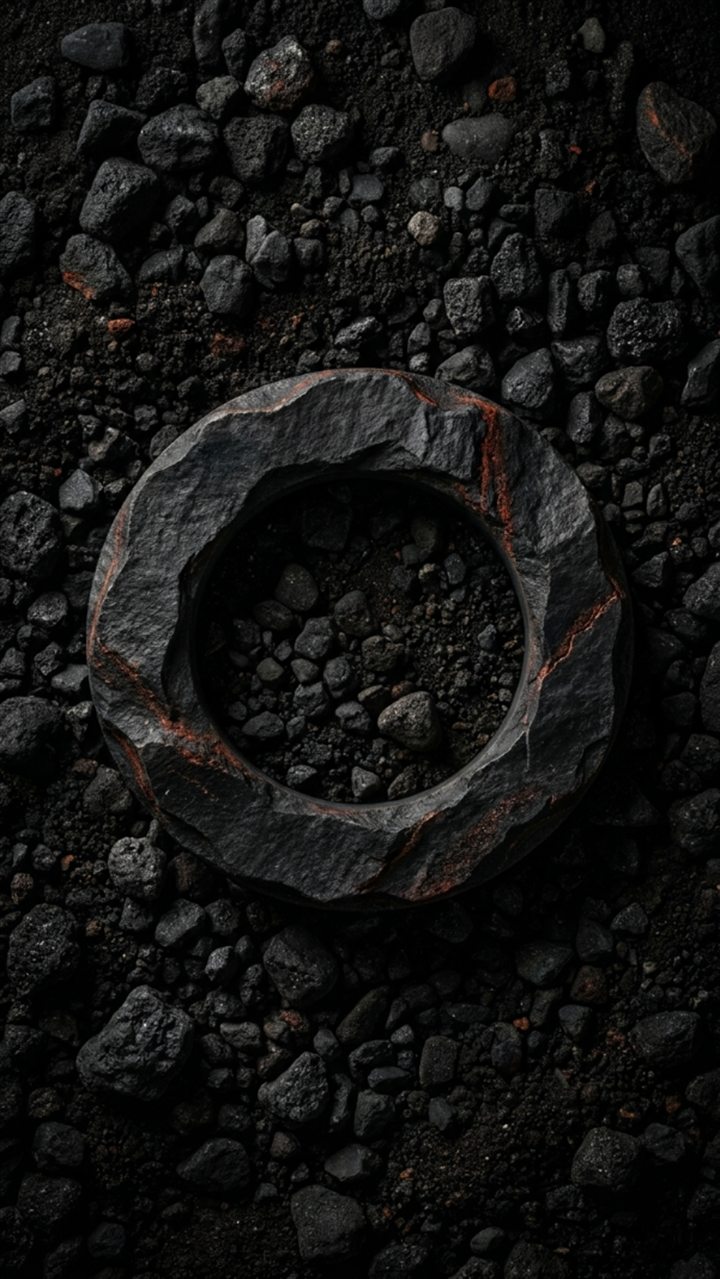
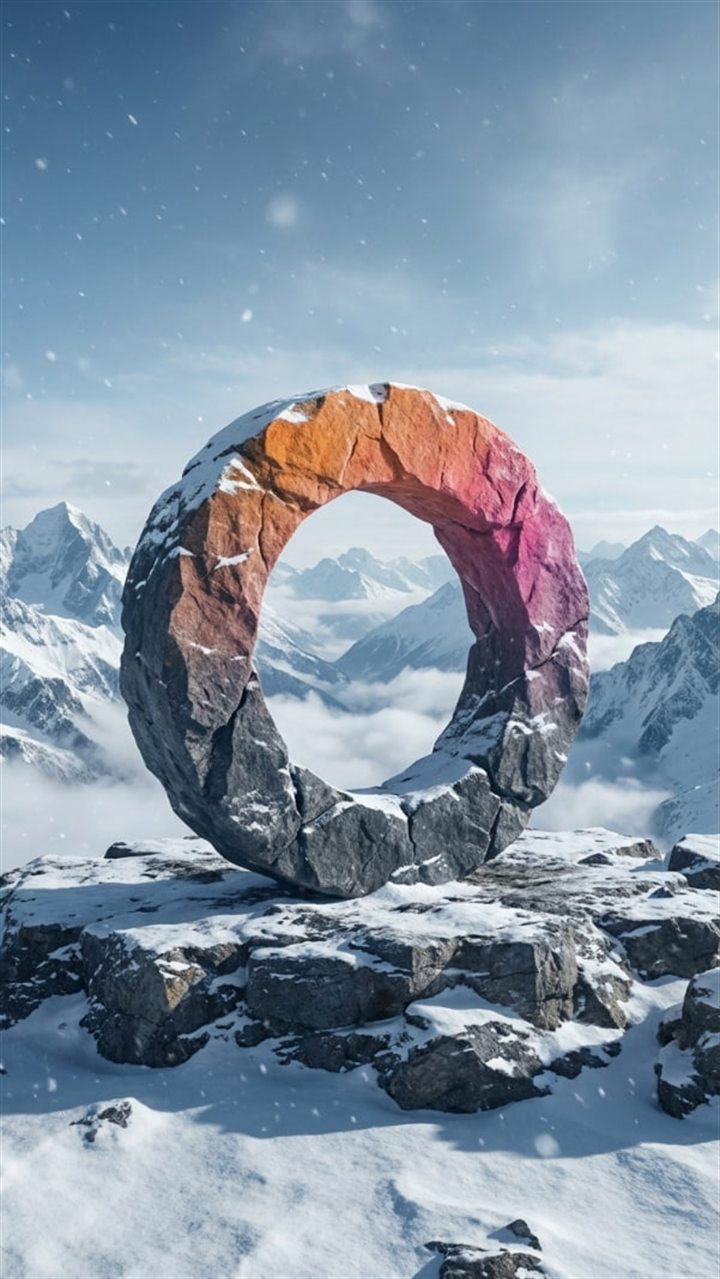
The OpenSyntheAI ring in stone monument in the mountains

SCENE 25

Stone monument in the mountains

Prompt
Create an epic but believable photorealistic vertical landscape using the attached logo or brand symbol as an immutable geometry reference.

LOGO FIDELITY:
Preserve the supplied symbol's exact silhouette, proportions, orientation, negative spaces, thickness, internal geometry, angles, curves, and every distinctive detail. Remove the original background and do not redesign, simplify, add, subtract, rotate, mirror, stretch, compress, fracture, or replace any part. The monumental scale and stone texture must not alter the identity.

SCENE:
Recreate the logo as a monumental freestanding sculpture carved from dark charcoal mountain stone. The sculpture should have massive believable depth, subtle layered mineral grain, fine frost along selected upper surfaces, restrained weathering, and a matte rugged finish. Place it securely on a snowy alpine ledge surrounded by distant dramatic mountain peaks. The immediate platform should be stable rock with a light cover of snow, while the far landscape falls into atmospheric blue-gray depth.

COMPOSITION:
Vertical 9:16 frame. Position the logo in the central lower-middle area, facing almost directly toward the camera and occupying approximately 32 percent of the frame width. Use a slightly low perspective to communicate scale while keeping the full silhouette visible. Frame it with distant peaks and abundant open sky; nothing may overlap important geometry.

LIGHTING AND CAMERA:
Use cold early-morning alpine light, a soft warm sun edge from the upper left, cool ambient sky fill, subtle snow bounce, realistic long shadows, and light atmospheric haze in the distance. Use a 70 mm cinematic landscape lens look, sharp focus on the sculpture, layered depth in the mountains, and premium blue-gray color grading.

OUTPUT:
Epic photorealistic brand landscape, exact vertical 9:16 ratio, 1080 × 1920 pixels or higher, maximum detail, realistic stone and snow, cinematic scale, precise logo fidelity.

NEGATIVE CONSTRAINTS:
No text, wordmark, additional icons, duplicate logo, altered proportions, missing details, closed negative spaces, broken monument, collapsing rock, human figures, climbers, buildings, flags, roads, fantasy castle, glowing portal, heavy snow covering the symbol, avalanche, extreme lens flare, watermark, border, signature, or AI artifacts.
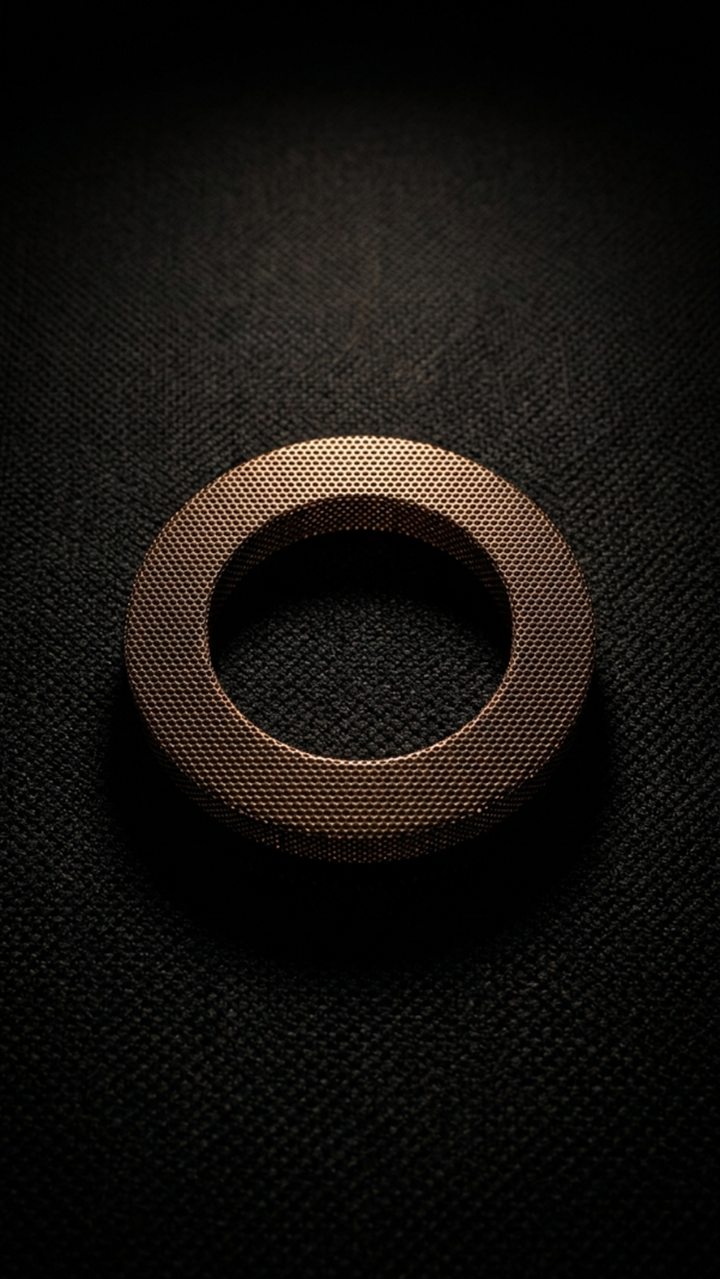
The OpenSyntheAI ring in mother-of-pearl on white linen

SCENE 26

Mother-of-pearl on white linen

Prompt
Create a delicate luxury macro photograph using the attached logo or brand symbol as the exact immutable geometry.

LOGO FIDELITY:
Isolate the attached symbol from its surrounding background and preserve the precise silhouette, proportions, orientation, negative spaces, shape thickness, internal geometry, edge relationships, and every identifying detail. Do not redesign, simplify, add, remove, rotate, mirror, stretch, compress, melt, or replace any portion. Iridescent color may shift across the surface but must not modify the shape.

SCENE:
Recreate the logo as a thin, solid, polished object made from creamy-white mother-of-pearl. The surface should display subtle natural nacre layers and restrained iridescent shifts of pearl white, pale champagne, blush, soft blue, and faint green. Give the object believable shallow depth, finely polished edges, and an elegant satin luster. Place it flat on pristine white woven linen with visible fine fibers, subtle natural folds, and a soft warm-white tone.

COMPOSITION:
Vertical 9:16 frame. Center the logo precisely and photograph it from almost directly overhead with a tiny oblique angle to reveal thickness. It should occupy approximately 38 percent of the frame width. Keep the white-on-white composition minimal, airy, and readable through controlled shadow and iridescence.

LIGHTING AND CAMERA:
Use a large diffused key light from the upper left, a soft reflected fill, a narrow light that reveals nacre colors, and a delicate contact shadow. Use a 100 mm luxury macro lens look, extremely crisp focus on the full logo, soft background falloff, and clean high-key grading.

OUTPUT:
Premium photorealistic jewelry-material photography, vertical 9:16, 1080 × 1920 pixels or higher, maximum micro-detail, realistic mother-of-pearl and linen, exact logo fidelity.

NEGATIVE CONSTRAINTS:
No text, wordmark, extra symbols, duplicate logo, altered geometry, missing details, closed negative spaces, rainbow saturation, glitter, sequins, gems, gold setting, jewelry chain, seashell props, hands, harsh gray background, transparent glass, glossy plastic, excessive reflection, watermark, frame, signature, or AI artifacts.
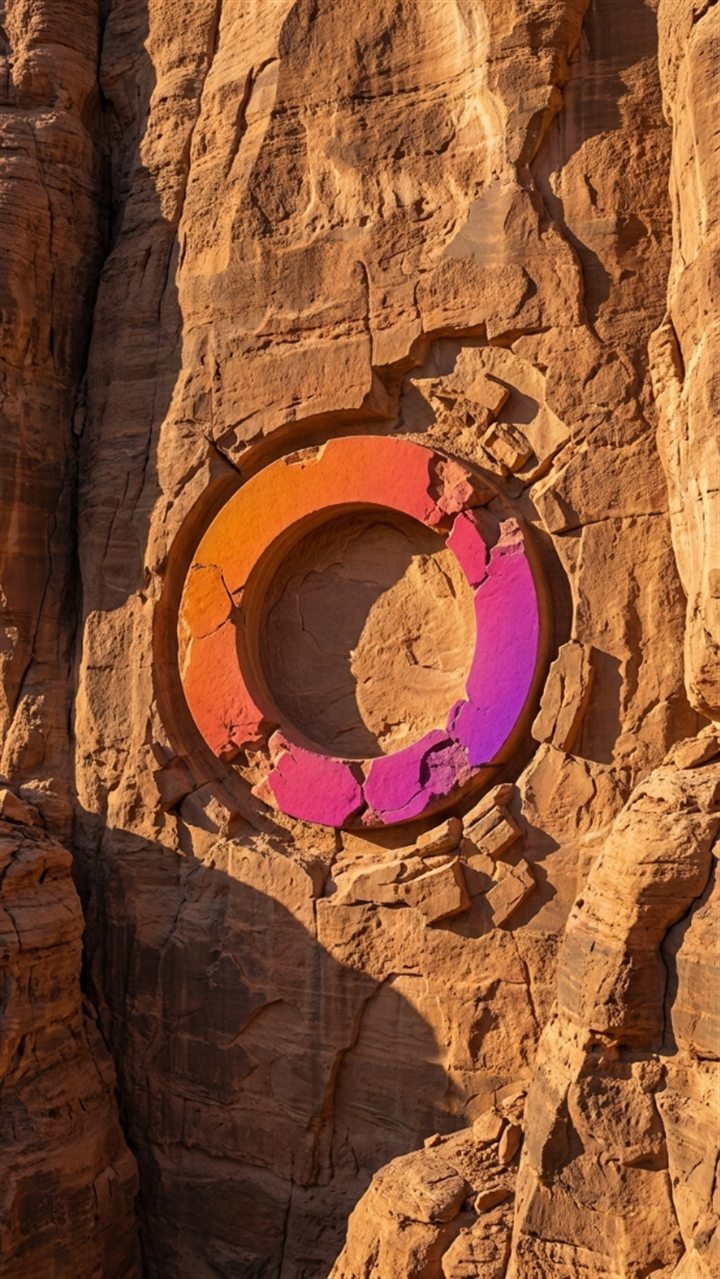
The OpenSyntheAI ring in monumental carving in sandstone

SCENE 27

Monumental carving in sandstone

Prompt
Create a cinematic photorealistic vertical landscape using the attached logo or brand symbol as an exact carving template.

LOGO FIDELITY:
Treat the supplied symbol as an immutable architectural stencil. Preserve its exact silhouette, proportions, orientation, negative spaces, thickness relationships, internal geometry, curves, angles, and distinctive details. Isolate it from the reference background. Do not redesign, simplify, add, remove, rotate, mirror, stretch, compress, merge, or replace any part. The carved recess must reproduce the logo precisely.

SCENE:
Carve the exact logo deeply into a monumental warm sandstone canyon wall. The symbol should appear as a large recessed relief with crisp recognizable contours, believable carving depth, rough chiseled interior surfaces, subtle erosion, and fine sand accumulated only along the lowest recesses. The surrounding rock should show horizontal sediment layers, warm ochre, amber, rust, and muted beige tones, with natural cracks positioned away from critical logo geometry. The setting should feel ancient, vast, and physically credible.

COMPOSITION:
Vertical 9:16 frame. Center the carved logo in the canyon wall, slightly above the middle, and make it occupy approximately 40 percent of the frame width. Use a straight-on or very slightly low camera angle to emphasize scale while avoiding perspective distortion. Fill the frame with rock and leave enough surrounding stone to establish the monumental setting.

LIGHTING AND CAMERA:
Use warm low-angle sunlight from the upper left, strong but natural raking light inside the recess, soft reflected fill from the canyon, fine airborne dust visible only in the distant light, and realistic shadow depth. Use an 80 mm cinematic lens look, sharp focus across the carving, rich sandstone detail, and refined warm color grading.

OUTPUT:
Epic photorealistic environmental brand visualization, vertical 9:16, 1080 × 1920 pixels or higher, maximum detail, realistic carved sandstone, precise logo fidelity.

NEGATIVE CONSTRAINTS:
No text, letters, wordmark, hieroglyphs, additional symbols, duplicate logo, altered proportions, shallow unreadable carving, missing details, closed negative spaces, rock collapse, large cracks through the symbol, people, ladders, tools, buildings, fantasy temple, glowing lines, painted color, watermark, border, signature, or AI artifacts.

The OpenSyntheAI ring in final identity reveal

SCENE 28

Final identity reveal

Prompt
Create a pristine final brand-reveal image using the attached complete logo as the exact and immutable source asset.

IDENTITY FIDELITY:
Reproduce the attached complete logo exactly as supplied. Preserve the precise symbol, wordmark, typography, spelling, capitalization, kerning, alignment, proportions, orientation, negative spaces, line thickness, internal geometry, colors, gradients, spacing, and every distinctive detail. Treat the original surrounding background as transparent. Do not redesign, retype, paraphrase, simplify, stylize, recolor, crop, rotate, mirror, stretch, compress, add, remove, or replace anything. This final frame must function as an accurate brand identity reveal, not as a creative reinterpretation.

SCENE:
Place the complete original logo on a pure clean white background. Keep the identity flat, crisp, and perfectly front-facing, with the original official colors reproduced accurately. The background should be uniform white with no horizon line, no texture, and no environmental elements.

COMPOSITION:
Exact vertical 9:16 frame. Center the complete logo lockup precisely both horizontally and vertically. Scale it so the entire identity is comfortably readable while maintaining generous white margins on every side. Preserve the original relationship between symbol, brand name, and tagline if all are included in the uploaded asset.

LIGHTING AND RENDERING:
Use clean vector-like rendering with sharp anti-aliased edges and accurate color reproduction. Do not apply photographic lighting because the identity must remain flat. Maintain high contrast and flawless legibility.

OUTPUT:
Final premium brand reveal, exact vertical 9:16 ratio, 1080 × 1920 pixels or higher, pure white background, maximum resolution, crisp vector-quality edges, exact official colors, faithful reproduction of the supplied identity.

NEGATIVE CONSTRAINTS:
No new text, misspelled text, changed typography, altered kerning, modified tagline, substituted font, additional icon, different logo, duplicate logo, 3D extrusion, bevel, embossing, drop shadow, reflection, glow, texture, mockup, paper, wall, gradient background, decorative frame, border, watermark, signature, or AI artifacts.

Quality control

Before approving each image, check these seven points:

  1. Instant recognition: the symbol should be recognizable without staring at it for several seconds.
  2. Exact silhouette: the outer contour must match the original.
  3. Negative spaces: no opening should have been closed, moved, or deformed.
  4. Proportions: the relationship between height, width, and thickness must hold.
  5. Distinctive details: no important cuts, curves, points, or divisions should be missing.
  6. Believable material: the texture must react to light and to its surroundings realistically.
  7. Consistent composition: the logo should keep a similar visual scale and enough space around it.

If any of the first five points fails, regenerate the image. Brand fidelity takes priority over how appealing the effect looks.

How to keep the 28 images consistent

  • Always use the same reference file.
  • Keep the 9:16 format across the whole collection.
  • Keep the logo near the center of the frame.
  • Aim for it to occupy between 32 and 42 percent of the width.
  • Use a front-facing or nearly front-facing camera.
  • Avoid overly complex backgrounds.
  • Keep one main light direction, from the upper left.
  • Use premium, natural color grading, without aggressive filters.
  • Export every image at the same resolution.
  • Name the files in order: 01, 02, 03, and so on.

Troubleshooting

The model changes the shape of the logo

Increase the reference image strength, lower the style strength, and regenerate. Don't try to fix wrong geometry with color editing.

The logo loses its inner spaces

Use a higher-resolution reference and make sure there's enough contrast between the symbol and the background. You can also upload a black version of the icon on a white background to reinforce the silhouette.

The material bleeds past or deforms the edges

Keep the negative constraints intact. If the problem continues, add this at the end of the prompt: "The material texture must stop exactly at the original logo boundary."

Invented letters or symbols show up

Generate using only the icon, not the full lockup. Confirm that text generation is switched off.

The image looks like an illustration

Select a photorealistic model and raise the quality. Reinforce the terms "premium product photography", "realistic material behavior", and "physically believable lighting".

The final scene changes the brand name

Image models can make typographic mistakes. For absolute precision, generate a clean background and place the original vector logo file on top during final editing.

Recommended flow for turning the collection into a video

  1. Generate and approve all 28 images.
  2. Export them all at the same vertical resolution.
  3. Order them according to the numbering in this guide.
  4. Hold each image between 1.5 and 5 seconds, depending on the pace you want.
  5. Use clean cuts, brief fades, or very subtle digital moves.
  6. Avoid transitions that deform the logo.
  7. Always close with scene 28, held long enough to read the identity.
  8. Add music and a call to action once the visual edit is finished.
Reels
reynielpaz

The same symbol in 28 different materials. Made with the prompts in this guide.

«FRAGMENTS» — Airmow

A real example: the full collection edited in vertical.

Creative applications

This collection can be used to:

  • Launch a new brand identity.
  • Create a Reel or launch video.
  • Develop a visual campaign built around materials.
  • Show how versatile an icon can be.
  • Create covers, backgrounds, or editorial pieces.
  • Build a case study for a portfolio.
  • Produce educational content about branding and artificial intelligence.
  • Explore possible physical finishes before manufacturing a real piece.

Terms of use

You may use these prompts for personal, commercial, or client projects, and adapt the scenes to whatever each brand needs.

You may not resell, redistribute, publish, give away, or present this guide — in whole or in part — as your own product, as a prompt library, or as a downloadable resource, without written permission from OpenSyntheAI.

The logos, brands, and assets you use with these prompts must belong to you or be covered by the appropriate permissions.

About OpenSyntheAI

OpenSyntheAI combines strategy, design, automation, and artificial intelligence to turn ideas into brand and growth systems.

Strategy • Design • Growth

More at https://www.opensyntheai.com

Was this guide useful?

5,0 out of 5 · 5 ratings

Want a collection like this for your brand?

You can use this guide yourself. And if you'd rather we produced it for you — with your logo, your art direction, and ready to publish — tell us what you need.

Tell us about your project